 Close
Close


A Quick Introduction to Unix evening course – places available
By Jasmin E Mullings, on 4 March 2019
Digital Skills Development are pleased to say there is still time to book a place on our course “A Quick Introduction to Unix” on 20th March from 17:30 – 20:30. Designed to introduce complete beginners to the operating system that sits under the bonnet of the internet, is the first choice for high performance computing and is seen on more and more desktop computers, this course will help you move into the computing fast lane.
A previous attendee said “Great and very enthusiastic lecturer. The course was very well paced. Good contents and very useful”.
Course Outline
============
- What is Unix?
- Types of Unix
- Files and processes
- The shell and subshells
- The Directory Structure
- Managing Files and Directories
- Understanding pathnames
- Working with Files on the screen
- Searching the contents of a file
- Redirecting Output
- Wildcards
- Simple scripting
- Getting Help
- Access rights
If you are interested in booking a place, please book via the following STBS link: https://www.ucl.ac.uk/hr/UCLTrainingBookingSystem/index/results?Model_Page-QUERY=ISUNIX&x=0&y=0
Globally De-activating Portico Enrolments
By Janice Kiugu, on 26 February 2019
Portico enrolments will be globally deactivated in Moodle on 5th March 2019. This is usually done six weeks from the start of each term.
How will this impact students on my course?
- Students who are already enrolled on a Moodle course WILL continue to have access to their course (s) and WILL NOT be unenrolled.
- Students enrolling on Portico after the deactivation WILL NOT be automatically enrolled onto the corresponding Moodle course. Students can still be manually enrolled.
- Students who leave the course WILL NOT be automatically un-enrollled
Moodle and Portcio enrolments
When Portico enrolments are active on a Moodle course, student enrolments on the course are automatically updated overnight to mirror the Portico student list for the associated module. Consequently, students who change courses, or withdraw from their studies permanently or temporarily, are automatically un-enrolled from their Moodle courses. Usually, this is desirable when students change/drop modules within the first few weeks of term. However, if Portico un-enrols students after they have been awarded any grades, these grades become inaccessible, which can be very problematic.
Note: the ‘inaccessible’ grades, submissions and logged activity are not deleted, and can be accessed again if the student is re-enrolled manually. But, when a student is no longer enrolled on a course, there is just no way to view their content.
Why deactivate Portico enrolments?
To reduce the likelihood of this particular ‘inaccessible/missing grades’ problem occurring, Portico enrolments are de-activated globally in Moodle, six weeks from the start of each term.
Can I re-activate Portico enrolments on my course(s)?
Yes. However, please assess whether you risk losing access to some students’ grades before you do this. See instructions on re-activating Portico enrolments
Note: Portico enrolments can be ‘deactivated’ within the course at any time by anyone with Course Administrator or Tutor access, thereby stopping any updates to the list of enrolled users on the Moodle course.
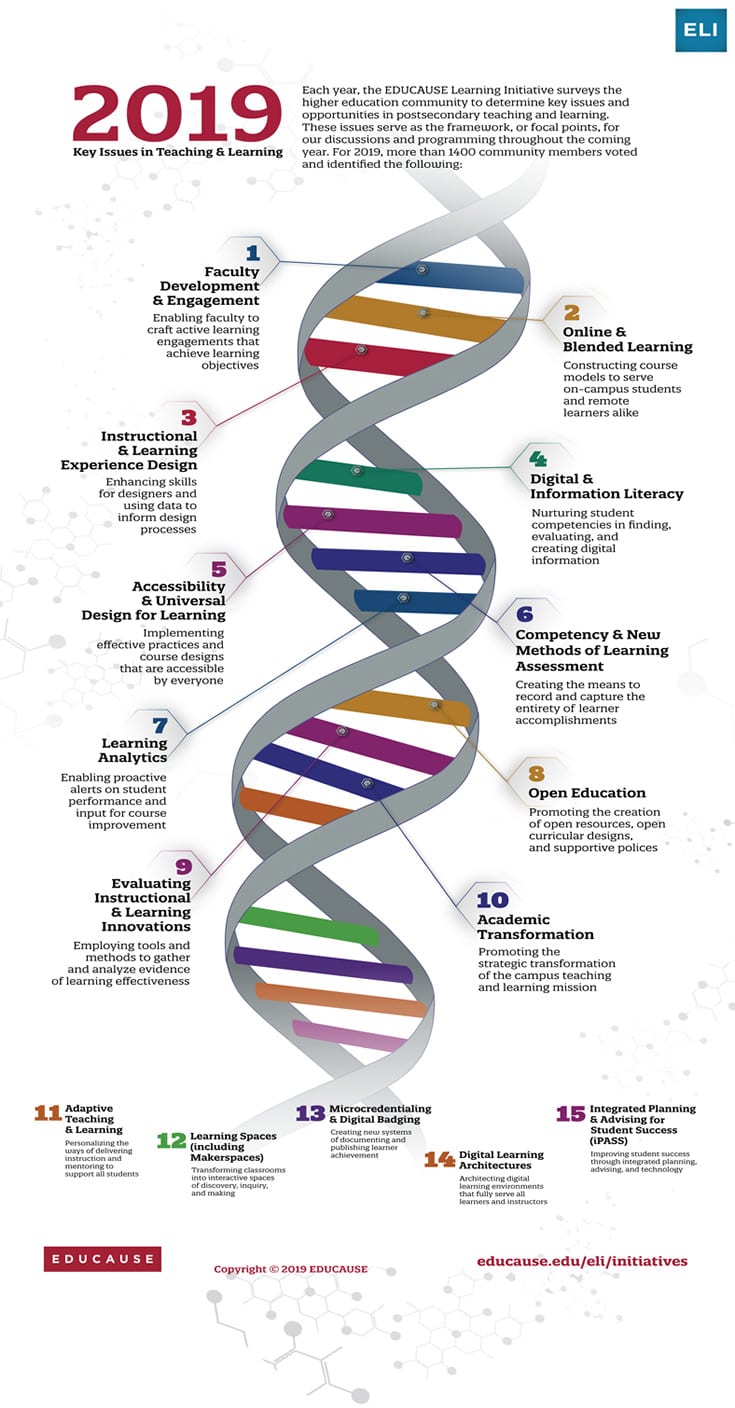
Educause – Key issues in T&L in 2019
By Clive Young, on 20 February 2019
A US focus to the infographic of course, but an interesting insight nonetheless.
Follow-up notes and “7 things” briefing papers at https://www.educause.edu/eli/initiatives/key-issues-in-teaching-and-learning
Turnitin and Moodle Assignment training
By Eliot Hoving, on 7 February 2019

The Digital Education team is running two new training courses, Hands on with Turnitin Assignment, and Hands on with Moodle Assignment. Each session is practical, from a staff and student perspective you will experience the process of submitting, marking, returning marks, engaging with feedback and managing records. Both courses are applicable to Tutors and Course Administrators new to online marking or needing to refresh their knowledge.
Register through the HR Single Training Booking System or follow the links below:
Hands on with Turnitin
Hands on with Moodle Assignment
Email digi-ed@ucl.ac.uk for more information or to inquire about specific training for your Department.
Develop your digital skills this academic year – new dates released
By Jasmin E Mullings, on 7 February 2019
 ISD Digital Skills Development has released new dates for the second half of Term 2. As usual, we are offering a wide range of courses covering Excel, Photoshop, Matlab, Stata, and more..
New this February we have a course in Markdown, a lightweight markup language that allows the creation of formatted documents using only plain text.
Following our successful introduction of Excel Essential Skills workshops last year, we have now added Word workshops for students. Find out how to Make light work of writing up in our Sway presentation. (Want to make your own Sway? Come along to a mini demo session with Digital Skills Development at IOE.)
See below for our current schedule of courses and workshops and details of how to book.
More digital skills development opportunities…
Digital Skills Development at IOE offer training in a wide range of digital tools including Microsoft SharePoint, Teams, OneNote and Visio, screencasting, infographics, mind mapping and presentation tools, with some sessions specifically aimed at Mac users. You can also learn about text-to-speech software, polling, blogging and much more. Visit the Digital Skills Development at IOE booking system for details and to book. Sessions are open to all UCL staff and students.
We have a vast range of high-quality video-based courses available at Lynda.com. These cover technical skills but also business, personal and creative skills as well. Visit the UCL Lynda.com page to find out more.
Not sure what you need or have a more specific issue you would like help with? Come along to one of the Digital Skills Development drop ins for more individual support.
Current schedule
For a full list of courses and workshops take a look at our course catalogue. Visit the UCL booking system to book on the sessions listed below. Enrol on our Moodle course to be the first to be notified about any new sessions. Please note that the booking links for Excel Essential Skills Workshop 2 and 3 are only made available to those who have completed Excel Workshop 1.
| 19/02/2019 | 10:00 | 13:00 | Getting Started with Markdown |
| 20/02/2019 | 16:00 | 17:00 | Excel Essential Skills – Workshop 2 |
| 21/02/2019 | 10:00 | 13:00 | Data Visualization in R with ggplot2 |
| 26/02/2019 | 10:00 | 13:00 | Introduction to Photoshop CS4 |
| 27/02/2019 | 16:00 | 17:00 | Excel Essential Skills – Workshop 2 |
| 01/03/2019 | 09:00 | 10:00 | Word Essential Skills – WORKSHOP 2 |
| 01/03/2019 | 10:00 | 11:00 | Word Essential Skills – WORKSHOP 2 |
| 05/03/2019 | 10:00 | 13:00 | Advanced statistics with Excel 2016 |
| 06/03/2019 | 16:00 | 17:00 | Excel Essential Skills – Workshop 3 |
| 07/03/2019 | 10:00 | 13:00 | Managing Long Documents in Word 2016 (STAFF ONLY) |
| 12/03/2019 | 10:00 | 17:00 | Introduction to Matlab (Part 1) |
| 13/03/2019 | 10:00 | 13:00 | Kick-starting your literature review |
| 13/03/2019 | 16:00 | 17:00 | Excel Essential Skills – Workshop 3 |
| 14/03/2019 | 10:00 | 17:00 | Introduction to Matlab (Part 2) |
| 15/03/2019 | 09:00 | 10:00 | Word Essential Skills – WORKSHOP 3 |
| 15/03/2019 | 10:00 | 11:00 | Word Essential Skills – WORKSHOP 3 |
| 20/03/2019 | 16:00 | 17:00 | Excel Essential Skills – Workshop 3 |
| 20/03/2019 | 17:30 | 20:30 | A Quick Introduction to UNIX |
| 21/03/2019 | 14:00 | 17:00 | Introduction to Visualising Data with Matlab |
The Lecturecast system has a new interface
By Janice Kiugu, on 23 January 2019
 Users of the Lecturecast system will notice that there has been an update to the user interface. The new interface makes finding content and courses easier. It also provides improved search and sort functionality as well a new filtering system. The change mainly affects staff. Most users may not notice the change but users who frequently access the ‘Library’, now known as ‘My Content’ and who use the engagement tools should familiarize themselves with the changes. The new interface is quite intuitive but if you find yourself wondering where some aspect of Lecturecast functionality now sits, you will find these guides useful.
Note that all content you had access to will still be available.
For any queries regarding this change, please email: digi-ed@ucl.ac.uk