 Close
Close


Jisc digital capability discovery tool
By Moira Wright, on 2 November 2017
UCL will be participating in the beta pilot of the Jisc digital capability discovery tool for staff and students which will run from December 2017 to May 2018.
The Jisc digital capability discovery tool has been designed to support staff across higher and further education and skills. It helps individuals to identify and reflect on their digital capability – particularly in relation to their work roles – and to develop their confidence through tailored feedback, ‘next steps’, and links to resources. Questions and feedback are mapped to the Jisc Six elements digital capability framework to provide a holistic view of the skills required. The discovery tool can also help managers and team leaders understand what support would be most helpful for their staff.
The tool uses the Potenial.ly platform and has tailored questions with one set for students and one for staff. The questions have been designed to capture the digital capabilities required to be successful in an educational context.
Users of the tool will respond to a series of questions that allow them to reflect on the digital skills they have already acquired and identify possible new ones. Feedback will include a digital capability profile and a summarised list of suggested actions.
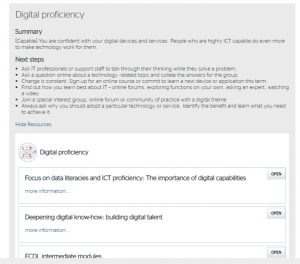
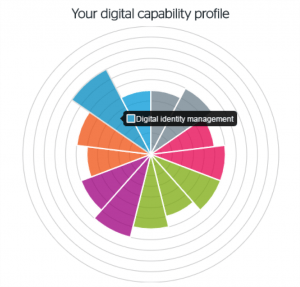
We’ll be making more announcements in the next couple of weeks providing information on how students and staff at UCL can access the tool.
If you would like to get involved in the pilot at UCL please contact Moira Wright.
Additional links:
Jisc Building digital capability project site: https://www.jisc.ac.uk/rd/projects/building-digital-capability
Jisc Digital Capability Blog: https://digitalcapability.jiscinvolve.org/wp/
New E-Book on Assessment, Feedback and Technology
By Tim Neumann, on 1 November 2017
UCL Digital Education Advisory members contributed to a new Open Access e-book that provides valuable insight into the way technology can enhance assessment and feedback. The book was launched formally on 26th October by Birkbeck College Secretary Keith Harrison, with talks from the editors Leo Havemann (Birkbeck, University of London) and Sarah Sherman (BLE Consortium), three case study authors, and event sponsor Panopto.
Havemann, Leo; Sherman, Sarah (2017): Assessment, Feedback and Technology: Contexts and Case Studies in Bloomsbury. London: Bloomsbury Learning Environment.
View and download from: https://doi.org/10.6084/m9.figshare.5315224.v1
The Book

E-Book Cover
The book is a result of a two-year project on e-assessment and feedback run by the Bloomsbury Learning Environment (BLE), a collaboration between five colleges, including the UCL Institute of Education, on issues around digital technology in Higher Education. It contains three research papers which capture snapshots of current practice, and 21 case studies from the BLE partner institutions and a little beyond, thus including practice from wider UCL.
The three papers focus on
- the use of technology across the assessment lifecycle,
- the roles played by administrative staff in assessment processes,
- technology-supported assessment in distance learning.
The case studies are categorised under the headings:
- alternative [assessment] tasks and formats,
- students feeding back,
- assessing at scale,
- multimedia approaches, and
- technical developments.
Seven of the 21 case studies were provided by UCL Digital Education colleagues Jess Gramp, Jo Stroud, Mira Vogel (2), and Tim Neumann (3), reporting on examples of blogging, group assessment, peer feedback, assessment in MOOCs, student presentations at a distance, and the UCL-developed My Feedback Report plugin for Moodle.
Why you should read the e-book

BLE E-Book Launch Event
As one of the speakers at the entertaining launch event, I suggested three reasons why everybody involved in Higher Education should read this book, in particular the case studies:
- Processes in context:
The case studies succinctly describe assessment and feedback processes in context, so you can quickly decide whether these processes are transferable to your own situation, and you will get a basic prompt on how implement the assessment/feedback process. - Problems are highlighted:
Some case studies don’t shy away from raising issues and difficulties, so you can judge for yourself whether these difficulties represent risks in your context, and how these risks can be managed. - Practical tips:
All case studies follow the same structure. If you are in a hurry, make sure to read at least the Take Away sections of each case study, which are full of tips and tricks, many of which apply to situations beyond the case study.
Overall, this collection of papers and case studies on assessment and feedback is easily digestible and contributes to an exchange of good practice.
View and Download the Book
The e-book is an Open Access publication freely available below.
For further information, see ble.ac.uk/ebook.html, and view author profiles at ble.ac.uk/ebook_contributors.html
The Bloomsbury Learning Environment is a collaboration between Birkbeck, London School of Hygiene and Tropical Medicine (LSHTM), Royal Veterinary College (RVC), School of Oriental and African Studies (SOAS), UCL Institute of Education (IOE), and the University of London with a focus on technologies for teaching and learning, including libraries and administration.
See www.ble.ac.uk for more information.
TechQual+ Survey at UCL
By Moira Wright, on 13 October 2017
In early 2016, ISD (Information Services Division) carried out the first Staff and Student IT Survey using TechQual+. Over 1,000 of you completed the survey, and over the past 16 months we have been working hard to improve our services in response to your comments.
Below are just a few examples of changes that have been made as a result of the feedback received from the TechQual+ survey run in 2016:
Wi-Fi 
A substantial investment in replacing and upgrading our Wi-Fi technology infrastructure
Service Desk
We’ve invested in staffing, tools and training to speed up response times and improve quality.
We’ve partnered with an external organisation and altered shift patterns to provide additional out of hours’ support.
Printing
We’ve rolled out 170+ additional printers over the past 18 months, targeting the busiest areas. This takes the current total to 660 printers. In areas of high usage, we’ve introduced new high capacity printers.
Infrastructure
We have invested in storage and now all staff and students can store 100GB for free.
Computers
We are continuing to invest in additional cluster PCs, and loan laptops where there isn’t space for desktops. We added a further 550 desktops and 60 laptops by September 2017.
We operate one of the largest laptop loan services across UK universities – 266 laptops across 12 locations – and this year a further 60 laptops were added.
Training
We delivered 221 courses last academic year, that’s nearly 1000 hours of training with about 3000 people attending. We are working hard to publicise the courses we offer.
Audio Visual
In 2016 ISD invested £2.5m into improving the technology in teaching facilities. Approximately 70 centrally bookable spaces had their facilities updated; this included bringing 43 spaces in 20 Bedford Way up to the standard spec including installation of Lecturecast in approx. 30 spaces. Lecturecast was also installed at 22 Gordon Street and Canary Wharf (3 spaces each). We also refreshed the Lecturecast hardware in 12 rooms.

Based on the findings of focus groups at participating institutions, the TechQual+ project has articulated a set of generalised IT service outcomes that are expected of IT organizations by faculty, students, and staff within higher education. The TechQual+ core survey contains 13 items designed to measure the performance of the following three core commitments: 1) Connectivity and Access, 2)Technology and Collaboration Services, and 3) Support and Training.
The TechQual+ survey will be run again at UCL in December 2017 and we’ll be asking for your help to advertise it to your students, encouraging them (and you!) to complete it. All respondents will be entered into a prize draw with a chance to win some great prizes!
We’ll be providing more information and communications about the survey closer to the opening date.
The E-Learning Baseline becomes Policy
By Karen Shackleford-Cesare, on 10 October 2017
 Most of you will be familiar with the UCL E-Learning Baseline. The Baseline sets out the minimum expectations for e-learning provision for all taught programmes and modules at UCL, with a focus on Moodle. Since 2011 the Baseline has been recommended ‘good practice’ and is already widely used. In July, however, the Education Committee upgraded its status by approving the following policy:
“The e-learning presence for every taught module will be reviewed against the UCL E‑Learning Baseline as an institution-wide activity [as of] 2017/18. The review will be repeated every three years, with the exception of, those modules which fail to meet the Baseline, or are new or substantially revised modules, which will need to be re-evaluated the following year”.
The ‘e-learning presence’ applies mainly to the use of Moodle, but includes other tools where used.
The new policy includes within it the requirement that lecture materials are made available 48 hours ahead of class (not part of the printed 2016 Baseline).
What happens next?
Starting this academic year, module leads are required to ensure their modules are reviewed against the Baseline. We anticipate most module teams will already have met the Baseline voluntarily, for example by using compatible departmental templates, and this will be a quick check. For others it will be an opportunity to reconsider and refresh the online content. Read detailed information about the E-Learning Baseline and advice on how to use it to enhance your e-learning provision.
Why has the Baseline Become Policy now?
We know UCL students value online provision and any complaints nowadays usually relate to how the use of Moodle is still too variable in their courses. The Baseline was highlighted for positive comment in the 2016 QAA Higher Education Review (HER) report. However, students continue to comment on poor information presentation and design in Moodle. In the 2016 IT survey, students called for more standardisation and use of templates, commenting on the need for more staff to use Moodle properly and effectively. Some representative quotes were:
- “I would just encourage information to be presented visually in an organised manner that emphasises important information.”
- “The usual problem: everyone is beavering away doing their bit and what is presented is a large number of silos of impenetrable information which makes anything useful absolutely impossible to find. Ask some students to hang around at the end of studies and write an online handbook for you.”
- “Moodle can be designed much more effectively and can be organised better.”
- “Sometimes it is difficult finding the course material we need on Moodle though that would probably be lecturers’ faults – tell them to be clear or lay out instructions.”
Where can I get help?
Digital Education is leading in the implementation of this policy and can support individuals and departments to help them meet the requirements of the baseline. Please contact digi-ed@ucl.ac.uk for assistance. More about the implementation framework and processes across UCL will be disseminated in due course. We are also developing a set of easy-to-use support materials including an online tool to check your modules.
Remind me what is in the Baseline
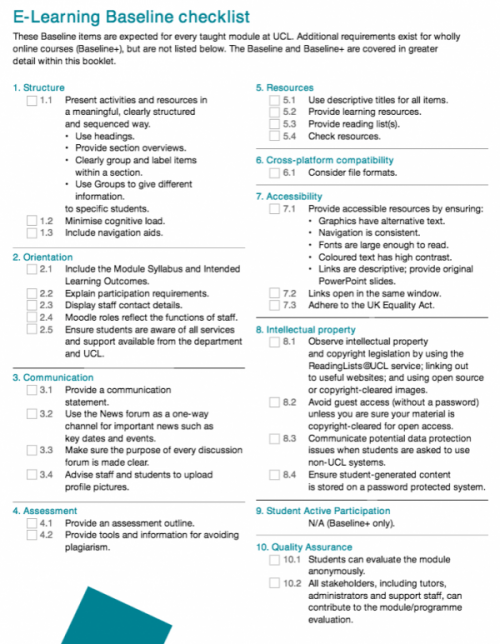
The UCL E-Learning Baseline key covers ten areas and represents ‘good practice’ by UCL departments, collected over many years :
- Structure – lay out a course clearly to enable navigation and ease of use.
- Orientation – ensure that students understand what is expected of them.
- Communication – ensure effective and consistent online communication.
- Assessment – present assessment requirements and provide guidance on avoiding plagiarism.
- Resources – present, label and manage supporting resources; lecture materials to be made available 48 hours ahead of classes.
- Cross-platform compatibility – ensure files and resources are accessible on a range of platforms and devices.
- Accessibility – ensure that resources are fully accessible to all including students with disabilities.
- Legal – model good copyright practices and comply with data protection legislation.
- Student active participation – (for students studying wholly online) encourage students to share resources, interact and participate online.
- Quality assurance – evaluate online provision to enhance quality.
More Information
- UCL E-Learning Baseline 2016 – you can download the Baseline as a PDF from this web page.
- E-Learning Baseline 2016 checklist (pdf 79KB) – copy of the checklist displayed above
- E-Learning Baseline Mythbusting quiz– How well do you know the baseline?
You can also request hard copies of the baseline booklet to be delivered to your department.
Sneak a peak at the new (more accessible) UCL Moodle theme
By Jessica Gramp, on 9 October 2017
As part of a wider Accessible Moodle project, a new UCL Moodle theme is being designed to make it more accessible for those with disabilities. The theme is like a skin (or a wallpaper) that changes the way the text and colours are displayed, without changing any of the content that exists on each Moodle page. As well as changing the look and feel of all Moodle pages, it will provide additional navigation aids in the form of menus, blocks that can be hidden and potentially also docked blocks, which sit to the left of the page for easy access.
The new theme will be rolled out to all staff and students in the next major upgrade of UCL Moodle in summer 2018. The Moodle theme is applied to a user account and in Summer 2018 everyone will be switched to the new theme automatically as part of the UCL Moodle Summer Upgrade. The theme is not to be confused with Moodle course formats, which allow you to change the way a Moodle course is laid out.
I wrote earlier on how the new theme will address accessibility issues. A number of staff across UCL provided feedback on the proposed theme and after a number if iterations, we have now agreed on a design that foremost meets the needs of staff with particular disabilities, as well as being more usable for everyone. As well as working with individuals who participated in the project’s initial focus groups, the E-Learning Champions were also given the opportunity to feed in their comments on the proposed theme and forward this to interested colleagues.

The proposed new UCL Moodle theme showing collapsed topics format. Click to enlarge.
We had contemplated a pink theme, however, blue proved to be a better option for a number of staff with particular disabilities. The blue version was also more popular with those staff without disabilities. The below design shows how the tabbed course format will look, but with blue, instead of pink tabs, menus and links.

Tabbed course format but the pink tabs, menus and links will be blue. Click to enlarge.
The UCL Moodle homepage will be simplified and will provide more space for news relating to teaching and learning at UCL. The menus will be blue instead of the pink shown in the design below.
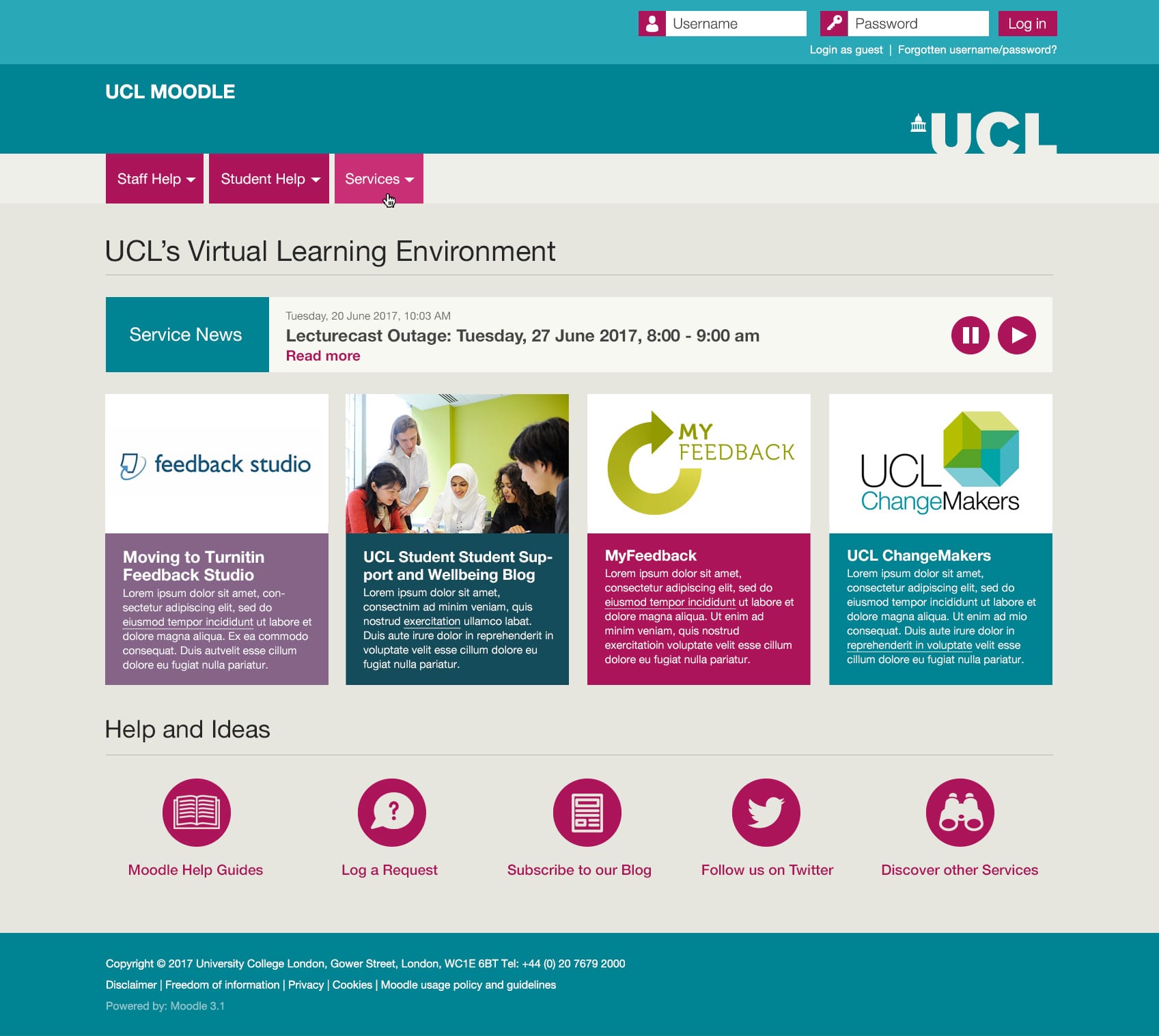
UCL Moodle homepage, but with blue instead of pink menus. Click to enlarge.
The Accessible Moodle project team at UCL worked closely with designer Ralph Bartholomew from St Albans Web Design and developer Pat Lockley from Pgogy Webstuff to implement the new theme.
If you have any questions or comments about the new theme, or would like to be involved in the pilot, please contact Jessica Gramp.
[Edited to remove reference to the theme pilot, which was not able to go ahead as planned].
Develop your digital skills this academic year
By Caroline Norris, on 29 September 2017
 ISD Digital Skills Development has released new dates for the autumn term. As usual, we are offering a wide range of courses covering Excel, Matlab, LaTeX, Photoshop and more.
As well as the popular Introduction to R we also have courses in data visualisation and manipulation in R. Please note that you should bring your own laptop for all of our R sessions.
This term we have some new workshops in Excel for students. These take a new approach to learning by presenting you with a problem to be solved and encouraging you to use your prior experience, web searches, in-application help and fellow participants to find a solution to the task.
By the end of the session you will have improved problem-solving skills, an increased knowledge of the topic, a ‘suggested solution’ to the problem you worked on and some resources and guidance for further learning. Our introductory series of Excel Essential Skills workshops cover creating calculated worksheets, data management and using in-built Excel functions.
For a full list of courses visit the student course catalogue or the staff course catalogue. Visit the student booking system or staff booking system to book.
| Please note that the staff booking system is currently not sending out course confirmations. However, your bookings are still being made. You can visit My Bookings to check your bookings while we resolve this issue. |
If you can’t attend any of the dates we are currently offering or there is no date available for the course you want, enrol on our Moodle course to be the first to be notified about any new sessions.
Don’t forget….
IT for IOE offer training in a wide range of digital tools including screencasting, blogging and Twitter, mind mapping and presentation tools, with some sessions specifically aimed at Mac users. You can also learn about text-to-speech software, how to make audio files from text and much more. The summer schedule is already published and sessions will be available to book from 24 April. Visit IT for IOE IT Course Booking for details.
We have a vast range of high-quality video-based courses available at Lynda.com. These cover technical skills but also business, personal and creative skills as well. Visit the UCL Lynda.com page to find out more.
Not sure what you need or have a more specific issue you would like help with? Come along to one of the Digital Skills Development drop ins if you want more individual support.