 Close
Close


Teaching continuity: Staff development sessions for teaching online with Moodle, Lecturecast, and Collaborate
By Jo Stroud, on 13 March 2020
UCL’s teaching continuity efforts include resources and information to support teaching and assessment of our students during the coronavirus (Covid-19) outbreak. In addition to extensive guidance material the Digital Education team will offer a series of staff development sessions for Moodle, Lecturecast, and Blackboard Collaborate. These sessions will be delivered remotely via Blackboard Collaborate and are available to all UCL staff.
**We will update this post with sessions as they are scheduled, so please check back regularly if you are interested in attending.**
General drop-in sessions: Moodle focus
Moodle is our primary learning platform and hosts a range of supported activities and tools to enable teaching online. These sessions will be offered on a drop in basis with no specific session aims.
No booking is required, to join a session navigate to the Connected Learning Live Sessions Moodle course, self-enrol, and select the appropriate session.
- General drop-in session – Moodle focus – TBC
General drop-in sessions: Tools for interactivity and active learning
In these sessions we will introduce the main interactivity tools available to staff:
- Mentimeter
- H5P
- Lecturecast ALP
Discussion will include the pros and cons of each tool, when it is recommend that they are used and why. As these are drop-in sessions, we will aim to answer all queries about the tools.
No booking is required, to join a session navigate to the Connected Learning Live Sessions Moodle course, self-enrol, and select the appropriate session.
- General drop-in session – Tools for interactivity and active learning – TBC
Lectures and instructional material: Lecturecast Universal Capture Personal
It is recommended that staff pre-record any material that is typically delivered as a lecture using Lecturecast Universal Capture Personal, rather than attempt to stream them live. These sessions will provide an introduction to the tool and highlight potential best practices for video recordings.
To enrol on this course via MyLearning, please select one of the following sessions:
Please navigate here for advice on How to enrol on a course or register interest in a course in MyLearning.
If you encounter any problems when attempting to enrol please contact isd-digiskills@ucl.ac.uk
Lecturecast: ‘The Fifteen Minute Flip’
Lecturecast provides a powerful suite of tools to facilitate student engagement. With these tools, Tutors can set up interactive activities, to engage and support students, while learners can access Study Guides which consolidate their notes and queries.
This online session, aimed at teaching staff, is designed to give participants hands on experience of these tools and how their use can benefit both staff and students.
At the end of this online course you will be able to:
- Recognise the various engagement tools within the Lecturecast system
- Appreciate and understand the benefits of using the engagement tools to engage with students before, during and after a lecture.
- Upload presentation slides into the Lecturecast system
- Create interactive question slides
- Run engaging teaching sessions using the Lecturecast engagement tools
No booking is required, to join a session navigate to the Teaching and Assessment Continuity – Staff Development Sessions Moodle course, self-enrol, and select the appropriate session.
- Lecturecast: ‘The Fifteen Minute Flip’ – 26th October 2020, 2pm – 3.30pm (90 minutes).
Seminars and group study: Blackboard Collaborate
It is possible for seminars and group study classes to continue as live, synchronous events and be recorded for review by any students who are unable to attend using Blackboard Collaborate. These sessions will introduce Collaborate functionality, demonstrate how to create a session within Moodle, and highlight some potential teaching approaches.
To enrol on this course via MyLearning, please select one of the following sessions:
Please navigate here for advice on How to enrol on a course or register interest in a course in MyLearning.
If you encounter any problems when attempting to enrol please contact isd-digiskills@ucl.ac.uk
Teaching Tools and Student Engagement
With the move to Connected Learning it is increasingly important to ensure students are on track and to be able to adjust teaching to changing student needs.
In these sessions we will:
- Discuss what we mean by student engagement;
- Identify key data sources;
- Discuss how these can be used to identify if students are on track and how they could be used to make ‘in-flight’ changes to our learning designs.
If you encounter any problems when attempting to enrol please contact isd-digiskills@ucl.ac.uk
Practical Online Teaching Tips
Themed drop-in sessions to learn about, discuss, and exchange practical online teaching tips. Sessions will be structured with:
- Talk-through of exemplars;
- Q&A and open forum to address individual issues.
Themed sessions:
- Keep it simple – tips for online session patterns;
- Keep it clean – tips for your Moodle course structure;
- Keep it manageable – running online discussions;
- Keep it fun – enhance the social presence.
Sessions will be moderated by Tim Neumann from the UCL Knowledge Lab and occasional colleagues.
No booking required.
Tips & suggestions? Log them here
Recordings of previous sessions on UCL Media Central
Further support
- Moodle Resource Centre
- Lecturecast Resource Centre: Lecturecast Universal Capture Personal
- Blackboard Collaborate Resource Centre
If you need more support with any of these tools, please complete the online form for teaching and assessment continuity.
If you have any issues in relation to accessibility, please contact us on: digi-ed@ucl.ac.uk.
Moving activities online – as easy as ABC?
By Clive Young, on 10 March 2020
ABC and learning types
As we focus on Teaching continuity, UCL’s ABC method of learning design can help us consider how to move learning activities online.
Many colleagues will already be familiar with the ABC sprint workshops for programme and module (re) design. During the high-energy 90’ workshop, academic teams work together to create a visual ‘storyboard’ showing the type and sequence learning activities required to meet the module’s learning outcomes and also how these will be assessed. Over 1000 UCL colleagues have now participated in ABC workshops since we started in 2015 and report it is particularly useful for new programmes or those moving to an online or more blended format.
The storyboard represents the learner journey and is constructed from pre-printed cards representing six types of learning.
The learning types are derived from the highly respected ‘Conversational Framework’ model of adult learning developed by Prof Diana Laurillard of the Institute of Education, UCL.
Video: Prof Laurillard introduces the Conversational Framework (Only the title is in Italian!)
The ABC cards list ‘conventional’ and digital examples activity associated with each of Prof Laurillard’s learning types, but teams are able and encouraged to add their own activities to the cards. Extensive testing at UCL and elsewhere has showed the creative hands-on, analogue format of the workshop stimulates a wide-ranging discussion. This includes the purpose of the course or programme, teaching methods, alternative technologies and assessment methods and above all the student experience. Even if you are not able to organise a ‘full’ ABC learning design event for your team, the cards themselves can help you identify digital alternatives to current activities.
Image: Example activities from the ABC cards.
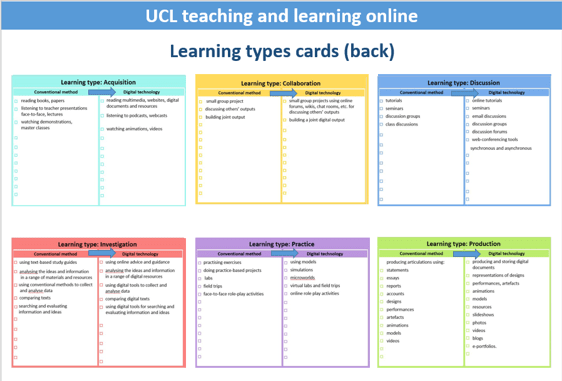
Video: Prof Laurillard introduces the six learning types (2′) Note: ‘Inquiry’ is used here instead of ‘Investigation’.
How can the six learning types guide us to consider digital alternatives to ‘conventional’ teaching and learning?

Acquisition
What learners do when they read books and articles, listen to lectures and podcasts, watch demos or videos. In this way learners acquire new concepts, models, vocabulary, models, and methodologies. Acquisition should be reflective as learners align new ideas to their existing knowledge. Conventional methods often include face-to-face presentations, demos and master classes.
Moving acquisition online: reading multimedia, websites, digital documents and resources listening to podcasts, webcasts watching animations, videos. Online quizzes can be used to check learner progress.
Key UCL tools:
- Moodle: Chat, Book, File, Folder, Page, URL (link), Glossary, Lesson, Quiz.
- Lecturecast Universal Capture Personal.
- Blackboard Collaborate.
- UCL Reflect (blog).
- UCL Reading lists.

Investigation
Encourages the learner to take an active and exploratory approach to learning, to search for and evaluate a range of new information and ideas. Students are guided to analyse, compare and critique the texts, data, documents and resources within the concepts and ideas being taught.
Moving investigation online: in many disciplines using digital resources and analytical tools are already part of students’ activities.
Key UCL tools:
- Moodle: Chat, Database, Forum, Hot Question, Questionnaire, Survey.
- Blackboard Collaborate.
- UCL Reflect (blog).

Practice
Enables knowledge to be applied in context. The learner modifies actions according to the task and uses feedback to improve. Feedback may come from self-reflection, peers, the teacher, or from the activity outcomes. Practice often includes significant face-to-face components including labs, field trips, placements, practice-based projects and face-to-face role-play and groupwork.
Moving practice online: The most challenging of the six activity types, some activities are hard to substitute without losing important learning outcomes. Videos of methods, simulations, models, sample data sets, image and video banks, online role-play and case studies may be used to address some of the learning aims. Online quizzes can be used to test application and understanding.
Key UCL tools:
- Moodle: Assignment, Assignment (Turnitin), Chat, Database, Forum, Glossary, HotPot, Lesson, Quiz, Wiki, Workshop.
- Blackboard Collaborate.
- UCL Reflect (blog).

Discussion
Requires the learner to articulate their ideas and questions, and to challenge and respond to the ideas and questions from the teacher, and/or from their peers. Conventionally this is achieved through face-to-face tutorials, seminars and class discussion.
Moving discussion online: There are a number of good online options, including Moodle discussion forums which can be real-time (synchronous) or run over an extended period (asynchronous). Online forums can be even more productive than conventional tutorials as more students may contribute. For a richer discussion, Blackboard Collaborate can be run as a synchronous session.
Key UCL tools:
- Moodle: Chat, Forum, Hot Question.

Collaboration
Requires students to work together in small groups to achieve a common project goal. Building on investigations and acquisition it is about taking part in the process of knowledge building itself. Learning through collaboration therefore includes elements of discussion, practice, and production.
Moving collaboration online: Some parts of group and project working lend themselves to digital communication to help discussion and planning of project outputs. The practical elements depend on the discipline but in some areas it will be possible to build a joint digital output and complete the task entirely online.
Key UCL tools:
- Moodle: Chat, Forum, Hot Question.
- Blackboard Collaborate.
- UCL Reflect (blog).

Production
How the teacher motivates the learner to consolidate what they have learned by articulating their current conceptual understanding and reflect how they used it in practice. Production is usually associated with formative and summative assessment and can cover a wide range of items; essays, reports, designs, performances, articles, models etc.
Moving production online: In some disciplines, digital representations are already common such as presentations, videos, slideshows, blogs and e-portfolios.
Key UCL tools:
- Moodle: Assignment, Assignment (Turnitin), Chat, Database, Forum, Glossary, HotPot, Lesson, Quiz, Wiki, Workshop.
- Blackboard Collaborate.
- UCL Reflect (blog).
Assessment
During the ABC workshop, assessment is usually addressed as a part of the (re) design process. Online formative assessment can be included in the learner experience using many of the tools and approaches listed above, such as Moodle Forum and Moodle Quiz. Online summative assessment is more complex and separate guidance is being prepared.
Developing your Digital Pedagogy
By Samantha Ahern, on 6 March 2020
Much has been written about the need to develop students’ graduate attributes and employability skills, in particular students’ digital capability.
In order for us to develop digitally capable students, we first need to be digital pedagogues. For us to be able to identify, use and select or de-select appropriate technologies that support and are truly a part of our pedagogy, we need first to develop our own digital capabilities as educators.
The European Union have done a lot of work on digital capability/competency frameworks, and have produced a framework specifically for educators – Digital Competence Framework for Educators (DigCompEdu). This is much more targeted than the Jisc Digital Capability framework.
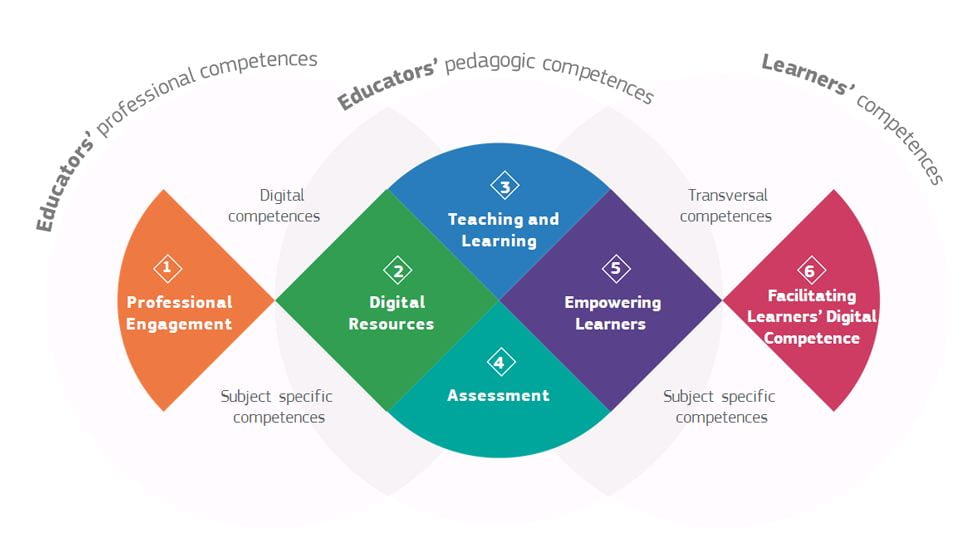
Image source: https://ec.europa.eu/jrc/en/digcompedu
In addition, a range of open access professional development materials have been produced for Higher Education directly linked to the DigCompEdu framework. In particular, FutureTeacher 3.0 and EduHack.
Future Teacher 3.0
This is an Erasmus+ funded project that had collaborators from the UK, Netherlands, Belgium and Norway. The project produced three main tools linked to the DigCompEdu framework predominantly aimed at developing the digital competencies of those delivering or supporting teacher and learning in the UK and Europe.
These tools are:
- Digital Thermometer
- A self-assessment questionnaire
- Digital Compass
- Analysis of current compentencies based upon Digital Thermometer responses and a recommended development pathway.
- Digital Journey
- A series of 10 online modules for teachers who use little ICT in their lessons and 10 modules for already experienced teachers.
The online module content does not map directly to UCL specific technologies but still covers all the key content.
In the video below from a Digital Education Showcase meeting I outline why I particularly like the DigCompEdu framework and provide some more information about Future Teacher 3.0 and played Jisc’s video about their Digital Capability Framework.
EduHack
This is also an Erasmus+ project, it is run by Politecnico di Torino (Italy), Universidad Internacional de La Rioja – UNIR (Spain), Coventry University (UK), Knowledge Innovation Centre (Malta) and ATiT (Belgium).
This project combines an online programme with EduHackathons where teaching professionals will learn how to produce digitally-supported learning experiences and will have the opportunity to experiment with creative models and approaches to teaching and learning, with a focus on fostering collaborative learning and student engagement.
Institutions are required to register to participate and in doing so run the EduHackathon event in the way prescribed.
However, you can access the EduHack online course without registering as an institution. You can register as an individual if you want to obtain a certificate of learning. The course has 4 main topic atreas, these are:
- Digital Resources,
- Teaching,
- Assessment
- and Empowering Learners.
Like the Future Teacher 3.0 materials, these are based upon the DigCompEdu framework.
Digital Education and Digital Skills Development
In addition to the generic resources described above, a wide range of training is provided by Digital Education. This includes UCL specific training on the teaching and learning tools that we support such as Moodle, LectureCast and Reflect. A wide range of online guidance is also available via the E-learning wiki. Full details of the E-learning training available for staff are available on the ISD website.
Digital Skills Development provide a training programme that can be accessed by all staff covering popular tools and software available on Desktop@UCL and Desktop@UCLAnywhere. For details of upcoming training please see the recent blog post Develop your digital skills this academic year – new dates released
Online resources to help support teaching continuity
As we are unable to deliver face-to-face sessions to support colleagues with the transition to online delivery of their courses we are provding a range of additional support:
- firstly, check-out the Teaching Continuity Guidance,
- we have a range of video resources to support teaching continuity,
- and are hosting a range of live online staff development sessions for Moodle, BB Collaborate Ultra and LectureCast Universal Capture Personal.
Additional Resources
The Coursera hosted Mooc Get Interactive: Practical Teaching with Technology from the University of London and Bloomsbury Learning Exchange is a 3 week course.
Each week focuses on a particular topic:
1. Using multimedia for teaching and learning
2. Encouraging student collaboration
3. Formative assessment and feedback
Seeking inspiration?
However, if you are looking for ideas on how to move towards or increase the use of e-learning tools in your teaching you might wish to review the ABC learning design process. In particular, review the learning type cards as these suggest digital approaches to learning.
There are also a number of case studies on the Teaching and Learning portal that discuss how a range of tools have been used by colleagues across the institution. Examples include:
-
Creating interactive video training guides in Moodle: Neil Roberts, Hannah Cooper and Carolina Leal
-
Medical Science students use UCL Reflect to create scientific blogs for assessment
-
Using Moodle Hot Questions to give all students a voice in the classroom
Develop your digital skills this academic year – new dates released
By Jasmin E Mullings, on 24 February 2020
 UPDATE as of 13th March 2020: Please note that all of our upcoming courses from 16th March – 30th April are cancelled following the Provost’s announcement that all face-to-face teaching events will cease from 13th March.
ISD Digital Skills Development has released new dates for the second half of Term 2. As usual, we are offering a wide range of courses covering Excel, R, LaTex, and more…
We have added a new session for our highly popular Creating accessible documents course. Making documents accessible is important for everyone, whether or not they have a disability or impairment. In this session you will learn how to make your PowerPoint, Word, Excel and PDF files more accessible. To find out more about creating accessible content, please visit our dedicated web pages.
You can now book courses in MyLearning via the UCL Learning page. The booking process isn’t currently straightforward so please follow the instructions on how to book on our separate blog post. We are currently having some issues with venue details not being sent out to those enrolling close to the course date so please check the venue in the schedule below.
See below for our current schedule of courses and workshops.
Current schedule
Please note that the booking links for Excel Essential Skills Workshop 2 and 3 are only made available to those who have completed Excel Workshop 1.
These courses still have places available, therefore, we encourage you to book:
| Date | Start time | End time | Course/workshop | Location |
| 28/02/2020 | 11:00 | 12:00 | Word Essential Skills – WORKSHOP 3 | Room 501, Institute of Archaeology |
| 28/02/2020 | 12:00 | 13:00 | Word Essential Skills – WORKSHOP 3 | Room 501, Institute of Archaeology |
| 11/03/2020 | 16:00 | 17:00 | Excel Essential Skills – WORKSHOP 2 | Room 501, Institute of Archaeology |
| 16/03/2020 | 13:00 | 14:00 | In a Nutshell: Survival analysis in R | Gavin de Beer Lecture Theatre, Anatomy Building |
| 17/03/2020 | 10:00 | 17:00 | An Introduction to R with Rstudio | PC Lab 1, IOE (20 Bedford Way) |
| 18/03/2020 | 10:00 | 13:00 | Data Manipulation in R with Rstudio | Room 316, 26 Bedford Way |
| 19/03/2020 | 14:00 | 16:00 | Creating accessible documents | Room 316, 26 Bedford Way |
| 23/03/2020 | 10:00 | 17:00 | An Introduction to R with Rstudio | Room G11, 26 Bedford Way |
| 24/03/2020 | 10:00 | 17:00 | LaTex with NatBib | Room 316, 26 Bedford Way |
| 25/03/2020 | 10:00 | 13:00 | Introduction to Visualising Data with Matlab | Room 316, 26 Bedford Way |
| 25/03/2020 | 16:00 | 17:00 | Excel Essential Skills – WORKSHOP 2 | Room 501, Institute of Archaeology |
| 26/03/2020 | 14:00 | 17:00 | Data Visualization in R with ggplot2 | Room G11, 26 Bedford Way |
| 27/03/2020 | 11:00 | 12:00 | Word Essential Skills – WORKSHOP 5 | Room 501, Institute of Archaeology |
| 27/03/2020 | 12:00 | 13:00 | Word Essential Skills – WORKSHOP 5 | Room 501, Institute of Archaeology |
| 30/03/2020 | 10:00 | 12:00 | Creating accessible documents | Room G15, DMS Watson Building |
These sessions are currently scheduled to take place, but be aware that they taking place during potential strike action so they may be disrupted:
| Date | Start time | End time | Course/workshop | Location |
| 02/03/2020 | 13:00 | 14:00 | Software for success: Data analysis and statistical tools | B03 Ricardo LT, Drayton House |
| 03/03/2020 | 10:00 | 13:00 | Advanced statistics with Excel 2016 | Room 316, 26 Bedford Way |
| 02/03/2020 | 17:30 | 20:30 | Introduction to Matlab (Part 1) | PC Lab 1, IOE (20 Bedford Way) |
| 03/03/2020 | 17:30 | 20:30 | Introduction to Matlab (Part 2) | PC Lab 1, IOE (20 Bedford Way) |
| 05/03/2020 | 10:00 | 13:00 | Introduction to Photoshop CS4 | Room G20, Christopher Ingold Building |
| 12/03/2020 | 17:30 | 20:30 | Introduction to Matlab (Part 3) | Room 2.23, Chadwick Building (Use South-East entrance only) |
| 13/03/2020 | 17:30 | 20:30 | Introduction to Matlab (Part 4) | Room 2.23, Chadwick Building (Use South-East entrance only) |
More digital skills development opportunities…
Digital Skills Development at IOE offer training in a wide range of digital tools. Sessions are open to all UCL staff and students. Highlights this term include:
- Creating Accessible PowerPoint presentations,
- Presentation Translator – add live subtitles to your presentations,
- Introduction to Stop Motion Studio animation (iPad app).
Other sessions include Microsoft tools such as OneNote, Sway, Teams and SharePoint. You can also learn more about EndNote, Pivot tables and VLookUp in Excel, mind mapping, infographics, video editing and much more.
Visit the Digital Skills Development at IOE booking system for details and to book.
Learn online with a vast range of high-quality video-based courses from LinkedIn Learning. This is the new platform on which we are now hosting Lynda.com content. These cover technical skills but also business, personal and creative skills as well. Visit the UCL LinkedIn Learning page to find out more.
Not sure what you need or have a more specific issue you would like help with? Come along to one of the Digital Skills Development drop ins for more individual support.
Moodle Outage and its possible impact on your course
By Anisa Patel, on 19 February 2020
Are you a Course Tutor? Do you administer courses for your department? This blog may be relevant to you!
As you may be aware we experienced some technical issues with various UCL applications and services on Thursday 13th February from 6:30pm onwards, extending over to 4pm on Friday. In order to ensure we did not affect student teaching and learning, Moodle was fixed as a matter of priority and was back online at 0:15am, Thursday night. See the link to the ISD News item for more info on affected services.
As a consequence of this issue and the emergency fixes put in place, we are aware that there has been a partial data loss issue which has affected all types of Moodle data generated between 4.30am-4.00pm on Friday 14th February. In particular live student assignments and activities which were undertaken.
You may already have had some reports of Moodle assignment submissions not appearing for students who submitted during this time as well as other activities being affected. Please note Turnitin Assignments were not affected as these are linked to the Turnitin database. In the case of a student undertaking an assessment during this period, such as a quiz, the data may also be impacted.
What action do I need to take?
We advise that you read and follow the instructions below, depending on which apply to you:
- If you had any Moodle assignment deadlines (not Turnitin) which took place over the past couple of days, please reopen and extend your assignment submission deadline and ask students to resubmit their assignments again if their assignment does not appear.
- If you have any open Moodle assignment submissions (not Turnitin) on your courses in Moodle, with a later deadline, please email your students to resubmit to the assignment submission if they have submitted early.
- If you notice any missing data on Moodle Forums or Questionnaires, please repost your message or extend the deadline.
- If you spot any missing assessment related data for quizzes, which is not recoverable such as missing answers which the student states they have answered, please raise a ticket and we will try and recover this data as a matter of urgency.
We apologise for the disruption this has caused and appreciate your assistance on this matter.
If you have any urgent queries, please contact digi-ed@ucl.ac.uk and we will try our best to assist you.
Digital Education
Tutor’s experience of using UCL Reflect with students
By Karen Shackleford-Cesare, on 12 February 2020
About Reflect and its User Group
Reflect, UCL’s educational blogging platform, has now had its first birthday and the Digital Education team are delighted that staff from across UCL have enthusiastically taken up the challenge of asking their students to blog, or produce other kinds of online assessment on Reflect.
Digital Education initiated the Reflect User Group (RUG) with its first face-to-face event on Thu December 12th, 2019 from 2-4PM. It was an informal ‘show ‘n tell’ opportunity for staff users of Reflect to compare and contrast their experience of using this tool in their teaching practice. Curious non-users were also welcome as we sought to expand its use to enhance teaching and learning.
We had intended to have the first RUG event in the Spring term, but Reflect user and Russian tutor in SSEES, Maria Sibiryakova asked us to step on the gas (accelerator) to make it happen sooner rather than later. She was very keen to meet fellow Reflect users, exchange ideas and learn of/from their experience and practice.
The tutor experiences showcased
The event showcased the experience of four teaching colleagues who used Reflect in the following ways (click on the bar for more):
- To build an ePortfolio in PGCE Primary Education
“Reflect as a portfolio tool” –
Ros Walford, Lecturer and Maria Hadjisoteris, Senior Teaching Fellow, IoE
Reasons for use
- For students to develop a reflective e-portfolio of their practice whilst on placement
- To facilitate more "back and forth" between teacher and student than was possible with the paper-based portfolio because it can be accessed online at any time.
- To eliminate the administrative overhead that managing paper binders incurred.
Outcomes
- A template was designed that had all the required sections and included guidance to students on adding content. Hence, each student received the same portfolio structure.
- Self-instructional video was created to get students up and running with their portfolio, which was effective and reduced the need for face-to-face sessions.
- As an ePortfolio in PGCE Post-Compulsory Education
"Portfolio assessment using the Reflect platform" –
Hilary McQueen, Lecturer, IoE
Reasons for use
- For students to develop a reflective e-portfolio of their practice whilst on placement
- To facilitate more "back and forth" between teacher/mentor and student than was possible with the paper-based portfolio because it can be accessed online at any time.
- To eliminate the administrative overhead that managing paper binders incurred.
Outcomes
- A template was designed that had all the required sections and included guidance to students on adding content. Hence, each student received the same portfolio structure.
- The portfolio template has tabs that usefully break down the requirements for students.
- It was possible to facilitate access to students e-portfolios by non-UCL staff mentors in the schools where UCL students were doing their placements.
Wish list
- A way to check progress – some kind of automatic system that shows what has been done and what is new, and ideally what has been checked as we have to keep separate records, which is very time consuming.
What I would do differently
- I would create a table for the observation form and insert ready for use.
- We would book a computer room and go through how to use Reflect.
- I would introduce Reflect (now I know how to use it) and ensure that other staff members were there, too.
- Have a test blog that everyone could add something to (say), just to practice.
- To address the aims of the Connected Curriculum and ensure students engage with researchers and the institution’s research
“Reflect for science blog assessments and showcase portfolios” –
Nephtali Marina-Gonzalez, Principal Teaching Fellow, Medical Sciences
Reasons for use
- The Department wanted to replace of traditional assessment methods with coursework activities designed to engage students in the research carried out in the Division of Medicine inline with the aims of the Connected Curriculum.
- To give Year 1 students an opportunity to create a public-facing output that showcased the research done at UCL and their understanding of it in terms suited for a lay audience.
Outcomes
- Students found this activity more engaging that last year’s traditional single answer question (SAQ) exam and general feedback from the students was very positive.
- There was a significant increase in marks for their blogs across the board relative to past exam grades, (namely, 71.4 +/- 6.1 blogs vs 56.1 +/-15 SAQ).
- Students were able to appreciate the importance of broad public engagement to their learning process. One student said:
“If you can’t explain something simply, you don’t really understand it”.
- An example of an excellent student blog post that achieved the aims of a Physiology module assessment: Cardiovascular effects of exercise training.
- See the same student's reflections on this learning experience.
For Neph's 5 top tips more about his experience with Reflect peruse his case study and interview
Wish list
- Better marking tools that were integrated with Moodle.
What I'd do differently
- Give the students several examples of what is expected of them.
- Invite UCL's Copyright officer to give a lecture to on copyright issues.
- Utilise the Open tool kit for students that Digital Education's Leo Havemann and Samantha Ahern are developing.
- Students found communicating scientific concepts in lay terms particularly challenging so the target audience of the blogs will be adjusted according to the level of expertise of the students.
- Build on our use of Reflect to have our students use it to create a 'showcase portfolio' that will trace their progress and achievement throughout their degree.
- Using blogs to develop foreign language writing skills
“The Use of Blogs in Developing Writing Skills in Russian” –
Maria Sibiryakova, Senior Teaching Fellow, SSEES
Reasons for use
- For students to create a language portfolio, which serves as an ipsative form of assessment. They contribute to it regularly and can get feedback from peers and externals as well as their tutor that feeds forwards into their next post.
- To motivate students to write more in Russian by:
- Providing an external audience for their work, not just their tutor
- Enabling them to see and comment on each other's work – peer review
- To prompt students to take responsibility for what they write both the:
- Content they create
- Language they use
Outcomes
- Students were less likely to submit a draft
- This new form of assessment was as effective as traditional methods, e.g. exams
- Students developed transferrable digital skills through their use of WordPress
Wish list
- Ability for students to see the number of views their posts have had
- Would like Reflect to have more support for marking
- To eliminate the need for Turnitin, Plagiarism as a trust issue
What I'd do differently
- Incorporate training on academic integrity
- Include a copyright statement and seek guidance/support from the UCL library.
For more view Maria's presentation slides.
Reflect user support
Krystyna Huszcza, Senior IT Trainer, Digital Education, ISD
Runs a hands-on workshop at basic/introductory level at least twice per term that is open to all staff and students. No prerequisites are required beyond an assumed comfort level with using word processors and browsers. The course description is presented below and you can find and book a place on the next workshop on the Digital Skills Development at IOE – Course Bookings page.
[Note: Staff wanting to arrange demonstrations or hand-on training for their students (and/or colleagues) at specific times should email digi-ed@ucl.ac.uk].
Blogging/WordPress: Blogging with Reflect (WordPress-based)
UCL Reflect is UCL’s new educational blogging service allowing students and staff to use blogging for teaching and learning. It is in fact a WordPress platform called CampusPress which offers access to many WordPress themes and plug-ins. See: UCL Blogging Service for more information about the Reflect service.
Individual blogs can be requested by staff or students. Teachers can request a Class blog to use with their students in teaching or for assessment. To request a Reflect blog please use the online form available from our wiki page: Requesting a blog
This introductory session will focus on the basics of working with an individual blog and aims to build your confidence for posting blogs and managing your account. It assumes you have very little or no previous WordPress experience. The session will cover many of the basics skills, introduce you to one or two advanced tools/features and point you in the right direction for further training and resources. Topics covered will include:
- Navigating Reflect
- Creating posts
- Formatting text
- Working with images
- Scheduling a time to publish posts and reverting to draft status
- Versions
- Categories and Tags
- Themes
- Widgets in sidebar
- Pages and Menus
- What are plugins?
- Privacy
- Useful settings and customisations
EARLY BOOKINGS REQUIRED: Please note that bookings for this course are only open until 4 days prior to the course to allow for time for a UCL Reflect blog to be created for you to use in the training session.
If you wish to create a Reflect blog well in advance of the session you may request one by completing the online form found on UCL's Reflect wiki page: Requesting a blog.
One of the things we had hoped to have time for at the meeting was to discuss how the RUG can be most useful to members. Although due to lively Q&A, we didn’t end up getting to that topic, we still want to hear your views on this. Hence, please let us know via our online form. All in all, we think the format of this meeting worked well and we intend to repeat it in the next few months.
Looking forward to the next User Group meeting, we are hoping once again to hear from staff with a range of use-cases for Reflect. Issues which we know people are working on include assessment criteria for Reflect blogs and sites, doing group work on Reflect, and comparing Reflect with MyPortfolio. Of course, if you would like to speak, or hear about particular things please complete this online form, we’ll be notified and get in touch.