 Close
Close


Research and Education Space (RES)
By Jessica Gramp, on 28 May 2015
 Mark Macey (mark.macey@bbc.co.uk) works on a project named the Research and Education Space (RES) as the Education Engagement Manager, which is being developed through a partnership between the BBC, Jisc and the British Universities Film and Video Council (BUFVC), who share the goal of building a platform that indexes and aggregates materials available for education and research use.
The RES project aims to help teachers and learners find online teaching resources in all subject areas and at all levels which can be relied on. RES is building an open, accessible catalogue of online educational resources that can be used in both Primary, Secondary, HE and FE teaching, either directly within classroom materials and on electronic whiteboards or in materials developed by educational publishers and software providers. The aim is for RES to make student’s learning more interesting, varied, colourful and informative and to allow teaching to become more enriched across different levels and subjects.
The RES project is in a developmental phase and research is needed to make the offer as rich and as useful as possible to those in education.
Mark is planning to hold research groups (made up of teachers from different subjects and across the HE/FE sector) in late June/ early to mid July in White City, west London (dates and times TBC depending on availability of attendees). It would be great to know if this is something that might be of interest and if you might be available and interested to attend to offer your knowledge and experience. If you are interested then please let Mark know (at the above address) what dates you can and can’t do in that period. The meeting is likely to be 4-5 hours. Travel expenses will be paid and there is a fee paid for a replacement teacher or direct to you – as well as tea, coffee, sandwiches and copious biscuits 😉
There are more details about RES below and on the attached Word doc and Mark would be interested in talking with you once you have read about the project. He is available to answer any more questions you might have.
Moodle 2.8 – Summer 2015 upgrade
By Domi C Sinclair, on 27 May 2015
For the attention of all UCL Moodle teaching and support staff.
At 17:00 on Friday 17th July 2015 Moodle will be made unavailable to allow the yearly snapshot copy to be created. Once the process is compete the snapshot will be made available for staff and students, this is expected to be completed by 17:00 on Saturday the 18th July 2015.
We will also be taking this opportunity to perform our yearly upgrade of the Moodle system as previously advertised. The live Moodle service will be returned to service no later than 10:00am on Wednesday the 22nd July 2015, although it is expected that the upgrade will be returned to service earlier than this time. However we need to include an “at risk” time to account for a full restoration of the service if something was to fail with the planned upgrade. We will keep you notified as to when Moodle will become available over the upgrade weekend via the ELE blog (blogs.ucl.ac.uk/ele) and out Twitter channel (@UCL_ELE)
For new Moodle upgrade features and changes please see the New Features page Moodle Resource Centre wiki.
If you would like to find out more about the Moodle snapshot (formerly the Moodle archive), including its intended purpose and how you can hide content, please visit the Moodle Resource Centre wiki for more information.
What do I have to do?
If your module ends before the upgrade and you would like the snapshot copy to be made available then no further action is required.
What if my course(s) doesn’t finish before the upgrade?
We recognise that not all Moodle courses will end before the 17th July. Some run into August/September and others may run later, several times a year or never stop. More information on the process of requesting a manual snapshot can be found in the Moodle Resource Centre wiki on the Manual Moodle Snapshot page.
What happens after the snapshot?
Once you have a snapshot copy of your course we strongly recommend you take some time to consider resetting and reviewing your course so it can be used for the next cohort. For more information on preparing your Moodle course for the next academic year, see the following: http://www.ucl.ac.uk/isd/staff/e-learning/tools/moodle/procedures/preparing
To see the snapshot (formerly archive) for yourself, visit: http://moodle-archive.ucl.ac.uk
All times are for the UK (BST), for other locations please convert: http://www.timeanddate.com/worldclock/converter.html
Students’ intellectual property, open nitty gritty
By Mira Vogel, on 19 May 2015
 What happened when staff on one module encouraged students to openly license the online products of their assessed group work?
Object Lessons is a module on Bachelor of Arts and Sciences at UCL. In keeping with its object-based nature and emphasis on inquiry and collaboration, part of the assessment is a group research project to produce a media-rich online exhibition. Because the exhibitions are lovely and shine a light on multimodal assessment, the teaching team are frequently approached by colleagues across UCL with requests to view them. In considering how to get students’ permission for this, Leonie Hannan (now at QUB), Helen Chatterjee and I quickly realised a few things. One, highlighted by an exchange with UCL’s Copyright specialist Chris Holland, was that the nature of the permission was hard to define and therefore hard to get consent for, so we needed to shift the emphasis away from staff and the nuances of their possible use scenarios, and onto the status of the work itself. Another was that since the work was the product of a group and could not be decomposed into individual contributions without breaking the whole, consent would need to be unanimous. Then there was the question of administrative overhead related to obtaining consent and actually implementing what students had consented to – potentially quite onerous. And finally the matter presented us with some opportunities we shouldn’t miss, namely to model taking intellectual property seriously and to engage students in key questions about contemporary practices.
We came up with four alternative ways for students to license their work ranging incrementally from open to private. We called these:
1. Open;
2. Publish;
3. Show;
4. Private.
You can read definitions of each alternative in the document ‘Your groupwork project – requesting consent for future use scenarios’ which we produced to introduce them to students. As part of their work students were required to discuss these, reach a unanimous consensus on one, and implement it by publishing (or selectively, or not at all) the exhibition and providing an intellectual property notice on its front page. That way staff would not have to collect consent forms nor gate-keep access.
Before we released it to students I circulated the guidance to two Jiscmail discussion groups (Open Educational Resources and Association for Learning Technology) and worked in some of their suggestions. A requirement that students include a statement within the work itself reduces the administrative overhead and, we hoped, would be more future-proof than staff collecting, checking off and filing paper records. While making it clear that students would not be at any deficit if they chose not to open their work, we also took a clear position in favour of Creative Commons licensing – the most open of our alternatives, since as well as flexibility and convenience it would potentially lend the work more discoverability and exposure.
What did the students choose? In the first iteration, out of ten groups:
- Five opted for Open. Between them they used 3 different varieties of Creative Commons licence, and one submitted their work to Jorum;
- Two opted for Publish;
- None opted for Show;
- Three opted for Private (including one which didn’t make a statement; since the group kept the work hidden this defaults to Private).
We haven’t yet approached the students to ask about their decision-making processes, but from informal conversations and reading some of the intellectual property statements we know that there are different reasons why half the students decided not to make their work open. One was the presence of elements which were not themselves open, and therefore could not be opened in turn. From evaluations of a number of other modules, we know that the students were not generally all that enthusiastic about the platform they were asked to use for their exhibition (Mahara, which is serviceable but vanishingly rare outside educational settings). This may have contributed to another factor, which was that not all group members felt the work reflected well on them individually.
Then there’s the matter of deciding to revoke consent, which is something individual students can do at any time. In the context of group work we decided that what this would mean is that if any group member decides at a later date that they want to reduce openness, then this effectively overrides other group members’ preferences. That doesn’t work in reverse though – a student can’t increase openness without the consent of all other group members. So here we are privileging individuals who want to close work, although we do encourage them to consider instead simply ending their association with it. We have yet to find out how this state of affairs works out, and it may take quite a while to find out. But so far it seems stable and viable.
We would be very interested in your views, suggestions and any experiences you have had with this kind of thing – please do comment below.
Particular thanks to Pat Lockley and Javiera Atenas for their input.
Image source: MicroAssist, 2012. Brass tacks. Work found at https://www.flickr.com/photos/microassist/7136725313/. Licensed as CC BY-SA.
The UCL Teaching Administrators Conference 2015
By Mira Vogel, on 18 May 2015
 UCL’s Teaching Administrators Conference is an event dedicated to supporting learning and teaching (in the professional services sense) which this year took place on 23rd April. UCL people can access conference materials including recorded plenaries, slides, &c from the dedicated section of the Teaching Administrators Forum Moodle space.
In his opening plenary the Provost Michael Arthur explained the early impact of UCL’s 2034 strategy. Three initiatives related to students’ experience were students undertaking Changemakers projects to shape their curricula, the Arena programme of professional development opportunities convened by CALT, and the Connected Curriculum with its throughline of research-based education. The Provost envisages teaching administrators “transporting the best ideas from students into the academic community” and helping to enact the Student Information Strategy. As such TAs would be “important if not powerful”. Asked about career progression opportunities within current structure, he emphasised that TAs would need to be prepared to move departments. On the mission critical Quality Assurance Exercise he had a clear message: “We’ve been complacent and I don’t think our processes are tight enough”.
I led a repeating session to find out more about workflows with e-assessment platforms in departments, with a view to feeding into the Jisc Electronic Management of Assessment project. Participants drew and wrote on an A3 sheet with a light structure. The idea was to give an occasion for reviewing the processes, to see what was happening in other departments, and to ask questions. Hopefully it was useful – there was certainly a lot of discussion. From this sample of 13 artefacts (some participants worked in pairs) it’s immediately clear that Turnitin use outweighs Moodle Assignment use, hardly any other digital platforms are used beyond those two, about half were collecting hard copy alongside the digital submissions, with a corresponding amount of paper-based marking but also some digitisation of paper-based feedback to pass back to students. Difficulties with blind second marking interfere with the uptake of e-assessment.
That left me time to attend one parallel session, Simon To and Tom Flynn on the Organisation and Management Benchmarking Tool co-developed by the NUS and the Association of University Administrators. The tool can be used by UCL’s Student Academic Representations (StARs, numbering around 800 these days). As well as helping identify priorities, it can also help to highlight trade-offs implicit in balancing organisation and management needs. The discussion raised many interesting questions. What happens when staff and student needs are mutually exclusive? How can institutions explain decisions to students? Which decisions do students want explained? Is there a gap on skills and knowledge? What can data from, say FAQ web pages, tell us about student needs? What is a good balance between being reactive and pre-emptive? For each of the framework’s 10 principles there are descriptors along a continuum from ‘Underdeveloped’ to ‘Outstanding’. Plenty of suggestions were made in the course of the discussion.
Other sessions included an e-learning update, managing an exam board, personal and professional development for staff, and several more.
Carroll Graham (University of Technology, Sydney) and Julie-Anne Regan (Academic Development Advisor, University of Chester) presented their research into what Australian and UK professional services staff understand to be their contribution to student outcomes. Their participants ranked their contribution to behaviours which promote positive student outcomes i.e. retention, persistence and success. There was clear agreement across countries that the most important contribution is institutional behaviours, environments and processes which are welcoming and efficient – this unpacks into responses to student inquiries and the quality of the institutional environment. However, there wasn’t much consensus, either within or between cohorts, on the other propositions, which the researchers put down to the diversity of professional roles compared to academic roles.
Wendy Appleby gave a lively talk on Student & Registry Services, with some illuminating organisational charts and the news that ‘flexible working’ may now be referred to as ‘agile working’, which sounds pretty dynamic. SRS will be heavily involved in the Student Information Strategy, the Student Centre and the QAA Higher Education Review. She reiterated SRS’ intention to work more closely with Teaching Administrators, where “‘closely’ means training rather than missives”.
Anthony Smith, Vice Provost for Education and Student Affairs closed the conference by thanking TAs for being front-line, key, and “the face of UCL”. 2034 envisions the integration of undergraduate research to take students to the edge of knowledge. Translating these high minded words into things departments can actually do will demand realism and creativity on the part of staff. The main elements of this plan are people, places, and practice – in other words, promotion of staff, work to improve learning spaces and partnership with the student body. The internal consultation for UCL’s education strategy has been launched.
Well done Stefanie Anyadi and the conference committee for another well run, diverse, stimulating and sociable event. Looking forward to the next one.

Assessment born digital – Sian Bayne at UCL
By Mira Vogel, on 12 May 2015
 Sian Bayne is Professor of Digital Education in the School of Education at the University of Edinburgh. She convenes the Digital Cultures and Education research group and teaches on the MSc in Digital Education, a fully-online course. At an earlier ELE Assessment & Feedback Special Interest Group (link for UCL people), Tony McNeill from SELCS – a graduate of that MSc – recommended we invite Sian to talk about assessment in a digital age, she kindly accepted, and Anthony Smith (UCL’s Vice Provost Education & Student Affairs) chaired the event. The abstract:
“The study and production of text is a defining academic activity, yet the way in which texts are shaped and shared in internet spaces presents an intriguing set of challenges to teachers and learners. Pedagogic work with the new generation of web artefacts requires us to work within a textual domain which is unstable, multilinear, driven by a visual logic and informed by authorship practices which are multimodal, public and sometimes collective. How can we critically approach these new writing spaces, as learners, teachers and scholars? Drawing on experience of conducting such assessment within a large, online Masters programme, the talk will demonstrate how assignments born digital can be rich, critical and creative. It will also consider how as teachers we can manage, mark and organise for these assessment forms.”
Sian’s MSc students have a range of digital skills. As a fully-online course contact is crucial, so students are required to blog frequently for a term, privately by default but shared if preferred, receiving individual feedback in the form of comments on posts. This is necessarily labour intensive for the teaching team since it is intended to replicate the one-to-one tutorial within the blog space, as far as possible. To build students’ confidence and skills with multimodal presentation they’re set a number of formative tasks in advance of higher stakes assessment – for example to rework a passage from Plato’s Phaedrus.
For high stakes assessment students have a choice – they can submit work in established essay form but have the option to instead work on digital artefacts out on the Web. Where these are public they can bring new and exhilarating kinds of attention, sometimes from the thinkers whose work they are referencing. Increasing numbers of students are choosing this multimodal alternative (a side effect is that the public nature of the work also raises the profile of the MSc).
Proposals to assess beyond the essay often prompt questions about the appropriateness of other modes for academic communication – as one person asked during the discussion, don’t images and music fall within a cultural domain apart from academia, an emotional realm of implicit meaning and taste – isn’t it more art than scholarly communication? Sian emphasised that multimodal assessment shouldn’t be treated as a special case, and that the MSc assessment criteria are conventional and shared with other postgraduate courses in Edinburgh. Moreover the student work we saw was sophisticated. A student used a screen capture of his explorations in Google Earth and Google Streetview, rhetorical forms attuned to the content of his work on flaneurship. To pose questions about the meaning of originality in a copy-paste age, another fabricated a plagiarised essay with each section linked to its source, juxtaposed with an essay on the same subject which adhered to established norms of academic integrity.
There was a question about whether assessment criteria conceived with text in mind could adequately comprehend the sensuality and interpretive ambiguity of multimodal work. Sian observed that the MSc assessors were alive to their burden of responsibility to interpret the work. There is a single holistic mark rather than breaking down by criteria, and there is moderation and sometimes third marking. Trust between marker and student is important; students and tutors need to know each other because assessing this kind of work depends on building a relationship between tutor and students. Sian explained that students are asked to propose their own assessment criteria in addition to the regulated ones. There may be much to learn from assessment practices in visual arts when assessing multimodal work in humanities and social sciences. There was a discussion about the role of images – it was clear that they needed to be doing rhetorical work, and students who simply used them illustratively or ornamentally tended to be marked down.
On more than one occasion Sian observed that “text is not being toppled”. Digital modes aren’t taking over; it’s more a case of what exceeds, rather than what comes after, ‘the essay’. Programmes and institutions who are doing this now are the ones which are willing to experiment.
If you’re at UCL and want to experiment with multimodal assessment, E-Learning Environments looks forward to working with you. Contact your school’s E-Learning Facilitator to discuss – Jessica Gramp (BEAMS), Natasa Perovic (SLMS), and Mira Vogel (SLASH). At UCL there are plenty of precedents, including Making History (History Department), Internet Cultures (Institute of Education), Digital anthropology, the BEng, and an object-based learning module called Object Lessons (more on the latter to come). See also Laura Gibbs from the University of Oklahoma in a short conversation with Howard Rheingold about how her students retell old stories in new ways.
UniVRsity – augmenting higher education with VR
By Matt Jenner, on 5 May 2015
Virtual reality (VR) has been hanging around for the best part of all your life and you’ve probably never tried it. But soon you might – it’s getting close to the mainstream. Gaming is often the focus for immersive technology but movies, simulations, social media, marketing and ‘edutech’ all have eyes on VR; curiously experimenting with what’s possible.
What is VR?
“Virtual reality is an artificial environment that is created with software and presented to the user in such a way that the user suspends belief and accepts it as a real environment”
TechTarget.
Hanging around the tributaries
VR is booming in early innovation tech circles and it’s keen to play on the main circuit with the other tech that is taking over improving lives. We don’t know if this will happen, obviously, but for the sake of learning, we’re exploring what’s going on in VR and being in e-learning, we’re doing it with an educational focus. New major technologies don’t tend to come around that often, the Internet was pretty major, as were smartphones and social media. Game-changing, life-changing, readily accessible technology isn’t made easily. But when it comes; you’ll know it.
VR might not ever go mainstream, and that’s OK.
History
The promise of virtual reality has always been enormous but has never quite lived up to the hype. The idea that you put on goggles, physically go nowhere but transform into anywhere is magical. With modern VR, this is increasingly viable – but that’s not always been the case.
VR in 2014 – “it was able to cross that threshold into presence where your brain is saying ‘Well, this is real’ and that difference is fundamentally the difference between VR that’s a promise and VR that’s actually here.”
Cory Ondrejka, co-creator of Second Life and VP of engineering at Facebook
VR was pretty bad in 1980s/1990s and did not get popular. Computer graphics were pixelated and that has a huge impact on the VR experience. You might remember any of the period between 8-bit games and Sony Playstation / Microsoft Xbox. Gameplay was compelling but the graphics were not close to realistic. The term ‘video game’ has always been slightly jarring; but now in the early 21st Century the live graphics rendering of computer graphics is very advanced; games and videos are becoming indistinguishable.
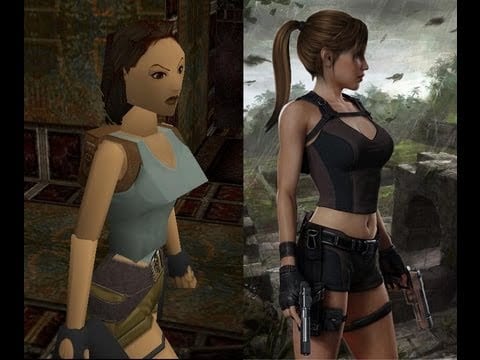
Evolution of Lara Croft 1997 (Eidos Interactive) to 2014 (Square Enix)
Convergence of graphics and video
Computer-generated imagery (CGI) has become very popular in the films industry. In early movies — like Jaws — big mechanical contraptions convinced us to be terrified of open water. Jurassic Park and Terminator II used CGI to encourage the real idea of fantasy and global destruction. The movie and games industries are merging; at least in terms of technology and invention. Blending CGI into real scenes has come a long way since Who Framed Rodger Rabbit; it’s now barely noticeable until something crazy-expensive or physically impossible happens. The offshoot of this is one industry can take the advances discovered elsewhere and then apply in their domain (or just gobble them up).
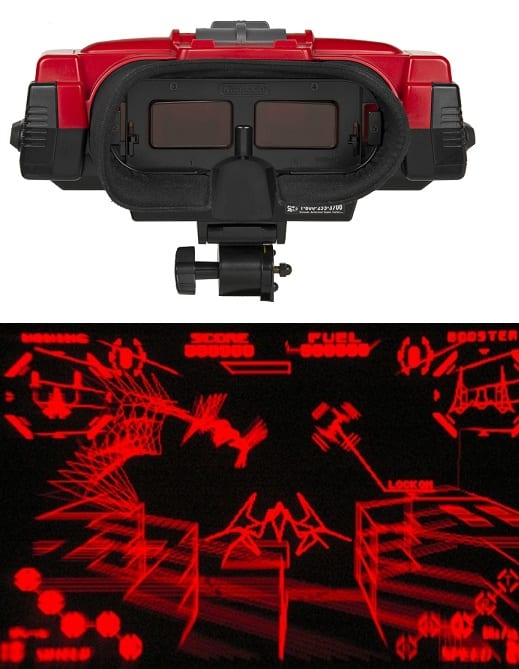
Virtual Boy by Nintendo and a screenshot of a game. Released 1995.
1990 – VR != Popular
The first steps into VR, mine at least, were to try a ‘Virtual Boy’ from Nintendo. The image above shows what it was like. Few but the dedicated player wanted one of these, Nintendo’s console didn’t sell well and sadly now they are expensive collectable items on shelves and clogging up eBay.
1990/2010 – VR = wha?
Mostly silence, ideas brewing and related technology advances…
2010 onwards
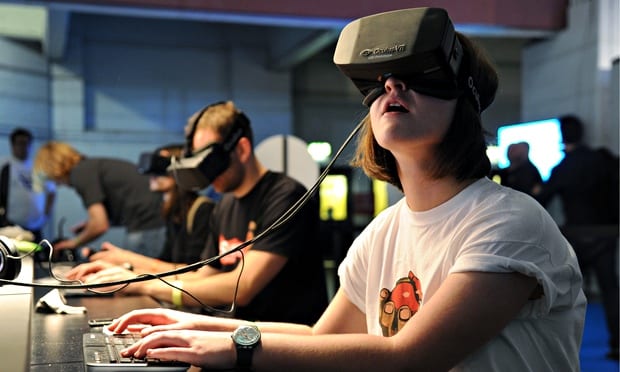
Oculus Rift released in 2012
Bang – it begins. A particular Kickstarter project got some attention and raised over $2m from a modest $250k goal. The early backers got development hardware and some even had to build it themselves from kits. This, by the way, in development technology circles, only excites people. In 2014 the second development kit for Oculus was released and many more people began to play and make VR. Oculus Rift was leading the field and many others were joining in.

MIT Technology Review – VR headsets – how they work. Source.
Oculus and others created headsets which when worn surround your eyes with into a virtually simulated space. When you turn your head, the space changes to naturally turn with you. Look up, see up, go down, yup – down it goes. It’s the same for any other direction. During 2014 Oculus Rift was purchased by Facebook for $2bn. If VR needed extra attention; it got it in 2014.
Going mainstream – a few challenges

Google released ‘Cardboard’ a low-threshold version which converts smartphones into VR machines (kinda…)
A good way for tech to be mainstream is for it to be useful and affordable. Google released ‘Cardboard‘, not to directly compete with Oculus, but mainly as a tech-demo / developer eye-opener. Costing more like $20 and using all the wizardry of your smartphone & some lenses, Cardboard proves that consumer-grade hardware is [pretty much] already here. It’s not very physically aesthetic, or comfortable, but it works and it’s in your pocket right now.
Smartphones might hold a part of the promise for consumer-friendly, cheap, VR and VR-related development. Hardware manufacturers are in a bit of an arms-race to get their smartphone-extenders into people’s homes. But there’s no major killer-app, yet. In other words; no-one knows why they want this & that’s problematic.
And that’s where we are right now.
VR in education
I would be confident to say this isn’t yet a field. Few people are active in the space of education and virtual reality. But that’s not a reason to be disinterested; in fact this is a great time to get involved, play, learn and understand more.
Developing VR content
This part remains tricky – creating multimedia content usually means a lot of talk and tech for the creation, and use of, video, images and text. 3D is not a commonly cited ‘media’ within the multimedia toolkit. Support is specialist/ non-existent and creation costs can grow quickly. This casts doubt over the rise of VR in education; but there’s no evidence to suggest this should remain the case.
VR and Video
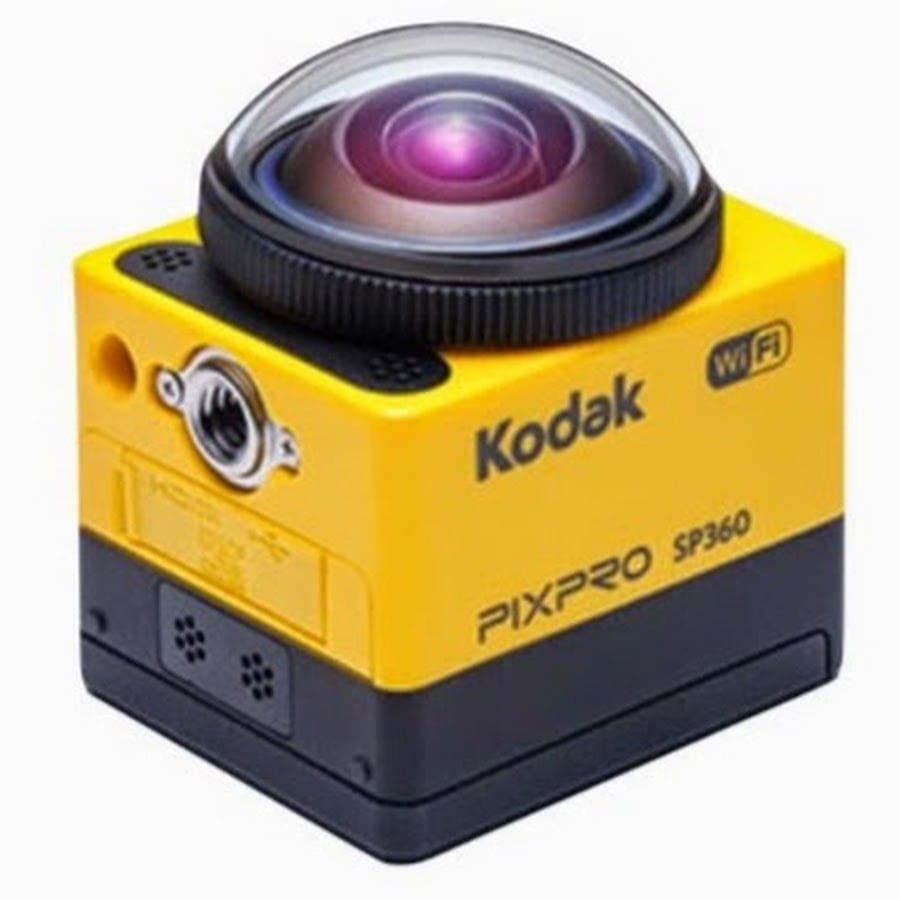
Kodak SP360 camera records in 360 degrees, playback can then be ‘discoverable’
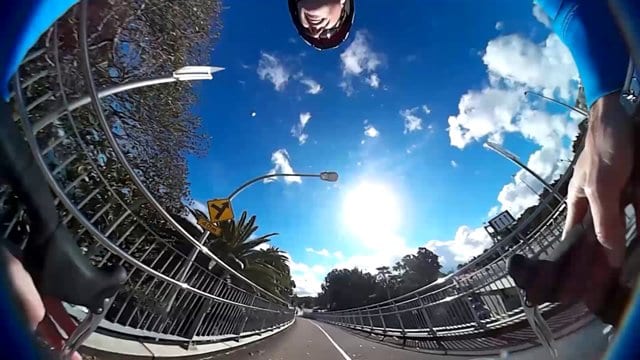
Video appears like this in a recording – but is then mapped onto a sphere, so it’s then visibly flat again (think: Earth).
Video, largely, is easy to make – turn on a camera and ‘do your thing’. Strapping on a VR headsets puts you in a world which you can be connected to and feel a part of. VR and video means a user can move (turn, pan, tilt) within that capture (or live) experience.
Kittens
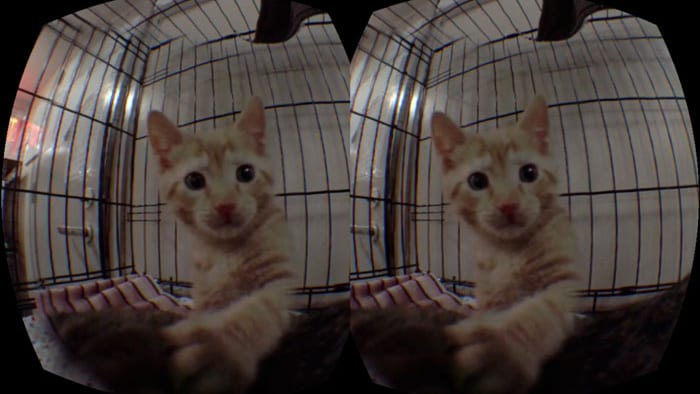
Yeah, kittens.
In one example the camera is placed in a centre of a cage. Using your head enables you to turn around and watch felines play, eat, sleep etc. I have never felt so small; watching tall humans walk by from my tiny cage. TALK TO ME BIG SCARY PEOPLE! I felt like a kitten. I wondered what do kittens think? Are they scared or just kinda sleepy? Kitten empathy came easily. A similar, more serious but less cute, outcome has emerged at the UN who are using VR to capture life in Syrian Refugees, and the daily life of people.
Augment, not replace, real
VR does not replace real experiences. Mostly. Instead you can explore places or things in VR that are just not possible. This might be because of cost, feasibility, scale or simply ‘freedom’. For example travelling to the sun or through the nervous system would be really, really hard, especially if you wanted to return home afterwards. Reliving, interactively, an event or experience is a huge challenge. Seeing every possible angle requires many eyes. With VR opportunities arise that were only imaginable before. VR, however, can be used to just add a new layer, perspective or experience onto the existing.
In education VR offers chances for connecting, disseminating, exploring or revisiting – and probably more.
Connect
Loneliness is cited as a problematic component of distance learning. I am not sure, yet, if VR can solve this challenge. But loneliness can come in many forms; if one is simply not feeling part of a group or culture; then I see this as a very cheap way of connecting someone to their campus, cohort or subject. International flight, as a means of connecting people, seems potentially wasteful. Instead VR might offer opportunities to connect people in ways we’ve never quite had before or just simulate stuff we do right now, meeting, talking, showing, etc.
Disseminate
Using VR to share findings with others. A top researcher may never have the time to explore all their findings, patterns, data, visualisations or other outputs from their research. With VR others can explore it as much as they like. There may brew open, shared environments – imagine ‘Physicsverse – a space to dump all your experiments’ simulating known physical rules, VR users can go and play, and combine, all the experiments. Maybe even discover something new..?
Explore
A camera can travel to places human bodies struggle with – in VR you can live the experience as if you were there. Gestures might control the robotic camera, and then you’ve got a live, immersive experience. Virtual worlds can be a model of fantasy or mapped out reality. Google have already snapped many of the world’s streets to a level of detail that you can now, in VR, go and walk down. If you want to…
Revisit
VR provides a re-liveable experience for common, or abnormal activities. What is it like to be on the Apollo Space Programme, a kitten (see above), waking into a building, going down a hill on a roller coaster, skydiving from a plane or even being eaten by a cow. Video and models can capture or create the scenery but VR can let you visit time and time again. During each iteration you may focus on a different area; imagine a film where depending on which character you follow the film adapts to your viewing habits. Or you could rewatch that lecture, if you want to =)
For now
I honestly have no firm idea but it’s really interesting to try and find out. We have some Oculus Rift and Cardboard VR kit to try and understand what it all means. The future is exciting in this space – but it’s not quite ready yet. VR will remain on the periphery for a little while longer. But don’t let that put you off; it could be quite transformational.