 Close
Close


Lynda.com becomes LinkedIn Learning
By Caroline Norris, on 16 January 2019
Our Lynda.com moved to the new LinkedIn Learning platform on 21 February. If you have a Lynda.com account you can activate your account on LinkedIn Learning at any time. New users can also register at any time.

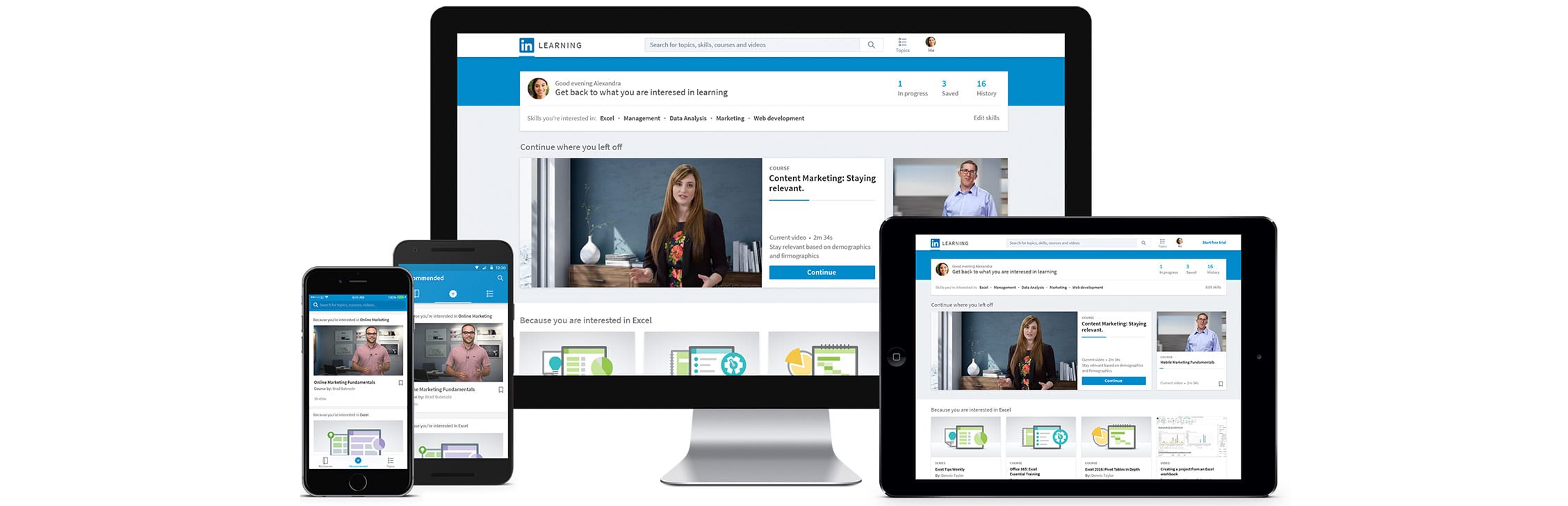 LinkedIn Learning offers a new interface and a range of new features while still providing the same Lynda.com content. If you currently have an account on Lynda.com, your viewing history, course completions, playlists and other data will all be migrated to the new platform.
What changes will I see?
- Your ‘Playlists’ will now become ‘Collections’
See What do I need to do? below for details of how shared links to your playlists are affected - You will be able to take your learning history with you to other organisations that have LinkedIn Learning
- You can connect your UCL LinkedIn Learning account to your personal LinkedIn profile if you have one
What happens if I connect to my LinkedIn profile?
You will get:
- more prompts to engage in learning, with LinkedIn Learning recommendations appearing within your LinkedIn profile
- more personalised content recommendations based on what your contacts and people with similar interests and roles are watching
- more insights into learning trends, what LinkedIn influencers and thought leaders are recommending etc.
UCL will only see your LinkedIn profile photo. We won’t have access to any other information from your LinkedIn profile. For more details please Privacy Information for LinkedIn Learning Learners.
What do I need to do?
You need to use a different link to get to LinkedIn Learning but you will still use your UCL credentials to log in and all your data has been migrated automatically to the new platform.
If you have shared links to any courses these will be redirected to a course in LinkedIn Learning for one year. You will need to provide a direct link to replace this after that time.
If you have shared links to playlists then these links will no longer work. Please contact us so that we help you to resolve this issue. Note that playlists assigned by Group Administrators are not affected.
You will need to download the LinkedIn Learning app to replace the Lynda.com app if you currently use Lynda content on your mobile or tablet.
How do I use LinkedIn Learning?
To find out more about LinkedIn Learning and the new features available, watch How to use LinkedIn Learning
You might also find Gaining skills with LinkedIn Learning of interest
Both of these courses are on LinkedIn Learning so they will give you a taste of what’s in store on the new platform!
Two-day NVivo training course for staff this February
By Jasmin E Mullings, on 11 January 2019
 Are you a member of staff interested in developing your knowledge of NVivo this term?
If so, we are offering an exciting opportunity to attend a two-day NVivo training course taking place on 27th and 28th February 2019 within the UCL Bloomsbury campus.
The 2 day course will be delivered by Dr Clare Tagg, an independent researcher and experienced QSR approved trainer. Clare has been providing workshops, advice and support for qualitative researchers using NVivo for over 15 years. Clare’s clients include academic institutions, charities, government bodies and research organisations, as well as individual students. Please see the outline for the course below:
- Day one: basic techniques to include
- Understanding different Nvivo source documents (internal, external, memos) and importing sources
- Understanding nodes – case and content nodes
- Coding source documents
- Annotations and links
- Understand the value of building effective node structures
- Work with text analysis and coding queries to explore and code textual data
- ‘Coding on’
- Day two: analysis of survey data in Nvivo
As the course will be run by an external trainer, we will be charging participants to attend at a cost of £200 per person (incl. VAT). Please note that the cost must be paid in advance via Inter Departmental Transfer (IDT) and is non-refundable unless we can find a replacement participant.
Places are limited to 12 seats and will be offered on a first-come, first served basis. If you would like to provisionally book a place, please email isd-digiskills@ucl.ac.uk by Monday 28th January at the latest. We will send the first 12 respondents details on how to pay for the booking by IDT. Your place will then be confirmed if we receive payment by Friday 8th February, otherwise it may be offered to someone else.
If you cannot attend these dates but are still interested, please let us know as we may schedule it again in the future.
Windows 7 Colour and Font Modifications Missing from Windows 10
By Michele Farmer, on 7 January 2019
The issue is that in previous versions of Windows, you were able to get into the settings to change the colour of the window background, so that when you opened a Microsoft Word or Excel file, the background colour on your screen was your chosen shade.
The window option allowed a colour chart to open up, where you could move the cursor around to find the exact shade you were looking for (alla Win 98, 2000, XP, 2007, etc.). In Microsoft 10, there is no simple option.
The current accessibility options provided by MS for Win 10 are pretty awful.
I have been in touch with Microsoft and they say that due to complaints that they will be bringing this facility back, but we do not know when.
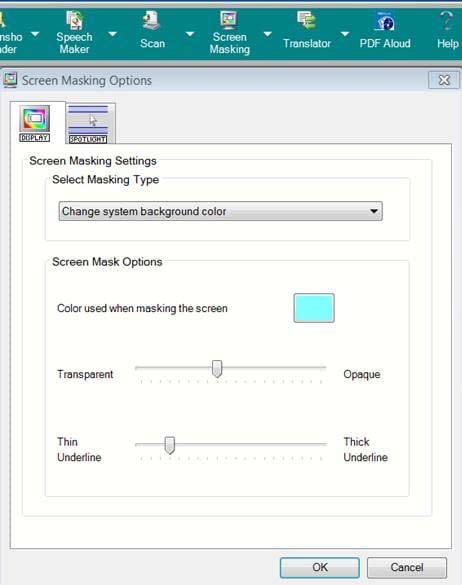
This window is no longer available

In the meantime UCL users can access a ‘Screenmasking’ option from a networked piece of software called TextHelp Read and Write. This software is either found on the Desktop@UCL, or from the Software Centre or Database.
New Digital Skills courses for 2019
By Caroline Norris, on 7 January 2019
 ISD Digital Skills Development has released new dates for the first half of Term 2. As usual, we are offering a wide range of courses covering Excel, Photoshop, R, Stata, and more..
Following our successful introduction of Excel Essential Skills workshops last year, we have now added Word workshops for students. Find out how to Make light work of writing up in our Sway presentation. (Want to make your own Sway? Come along to a mini demo session with Digital Skills Development at IOE.)
See below for our current schedule of courses and workshops and details of how to book.
More digital skills development opportunities…
Digital Skills Development at IOE offer training in a wide range of digital tools including Microsoft SharePoint, Teams, OneNote and Visio, screencasting, infographics, mind mapping and presentation tools, with some sessions specifically aimed at Mac users. You can also learn about text-to-speech software, polling, blogging and much more. Visit the Digital Skills Development at IOE booking system for details and to book. Sessions are open to all UCL staff and students.
We have a vast range of high-quality video-based courses available at Lynda.com. These cover technical skills but also business, personal and creative skills as well. Visit the UCL Lynda.com page to find out more.
Not sure what you need or have a more specific issue you would like help with? Come along to one of the Digital Skills Development drop ins for more individual support.
Current schedule
For a full list of courses and workshops take a look at our course catalogue. Visit the UCL booking system to book on the sessions listed below. Enrol on our Moodle course to be the first to be notified about any new sessions.
| 14/01/2019 | 09:00 | 10:00 | Word Essential Skills – Workshop 1 |
| 14/01/2019 | 10:00 | 11:00 | Word Essential Skills – Workshop 1 |
| 16/01/2019 | 10:00 | 13:00 | Excel 2016 Essential Skills |
| 16/01/2019 | 16:00 | 17:00 | Excel Essential Skills – Workshop 1 |
| 22/01/2019 | 10:00 | 13:00 | Intermediate statistics with Excel 2016 |
| 23/01/2019 | 10:00 | 12:00 | Pivot Tables with Excel 2016 |
| 23/01/2019 | 16:00 | 17:00 | Excel Essential Skills – Workshop 1 |
| 23/01/2019 | 17:30 | 20:30 | An Introduction to R with RStudio (Part 1) |
| 24/01/2019 | 17:30 | 20:30 | An Introduction to R with RStudio (Part 2) |
| 28/01/2019 | 09:00 | 10:00 | Word Essential Skills – Workshop 1 |
| 28/01/2019 | 10:00 | 11:00 | Word Essential Skills – Workshop 1 |
| 29/01/2019 | 14:00 | 17:00 | Using Excel 2016 to manage lists |
| 30/01/2019 | 14:00 | 17:00 | Introduction to Photoshop CS4 |
| 30/01/2019 | 16:00 | 17:00 | Excel Essential Skills – Workshop 1 |
| 05/02/2019 | 14:00 | 17:00 | Charting with Excel 2016 |
| 06/02/2019 | 16:00 | 17:00 | Excel Essential Skills – Workshop 1 |
| 06/02/2019 | 17:30 | 20:30 | An Introduction to R with RStudio (Part 1) |
| 07/02/2019 | 17:30 | 20:30 | An Introduction to R with RStudio (Part 2) |
| 11/02/2019 | 09:00 | 10:00 | Word Essential Skills – Workshop 2 |
| 11/02/2019 | 10:00 | 11:00 | Word Essential Skills – Workshop 2 |
| 12/02/2019 | 10:00 | 13:00 | Getting started with Stata (Part 1) |
| 13/02/2019 | 16:00 | 17:00 | Excel Essential Skills – Workshop 2 |
| 14/02/2019 | 10:00 | 13:00 | Getting started with Stata (Part 2) |
Innovating Pedagogy 2019
By Clive Young, on 4 January 2019
 The latest Innovating Pedagogy report from The Open University explores ten innovative trends in teaching, learning and assessment in eduction.
Aimed to inform ‘teachers and policy makers’, the annual report – this is the seventh – is free to download from www.open.ac.uk/innovating
The 2019 report was written in collaboration with the Centre for the Science of Learning and Technology (SLATE) in Bergen, Norway and sketches ten trends ‘in currency’ that they think have the potential to provoke major shifts in educational practice at all levels. These are listed below “in approximate order of immediacy and timescale to widespread implementation”. Digital education features of course, “technology can help us to do new things, rooted in our understanding of how teaching and learning take place”.
- Playful learning Evoke creativity, imagination and happiness
- Learning with robots Use software assistants and robots as partners for conversation
- Decolonising learning Recognise, understand, and challenge the ways in which our world is shaped by colonialism
- Drone-based learning Develop new skills, including planning routes and interpreting visual clues in the landscape
- Learning through wonder Spark curiosity, investigation, and discovery
- Action learning Team-based professional development that addresses real and immediate problems
- Virtual studios Hubs of activity where learners develop creative processes together
- Place-based learning Look for learning opportunities within a local community and using the natural environment
- Making thinking visible Help students visualise their thinking and progress
- Roots of empathy Develop children’s social and emotional understanding
Some of these ideas will be familiar, others more novel so the short sketches provide a useful overview and update, with links to further exploration.
December 2018 New Moodle Update
By Jon-Luc Holmes, on 21 December 2018
Following the scheduled outage on Tuesday 11th December, several known issues on New Moodle have been resolved. As a result of this work, you will now be able to:
- Allow you to add a new event in your calendar without receiving an error message.
- Allow you to manage subscriptions within your calendar without receiving an error message.
- Allow you to export your calendar, via URL or iCal, with all events.
- Show the breadcrumb trail consistently on pages such as the question bank.
- Correctly delete student test accounts when they expire.
- Allow for the creation of new student test accounts if you were at the limit from previously undeleted accounts.
Separately from the scheduled outage, MyFeedback has received a fix on New Moodle that restores the ‘My tutees’ block and correctly allocates tutors to tutees based on the information in Portico. This was a known issue for several months but is now resolved.
Finally, the Moodle Users Forum has been migrated from Legacy Moodle to New Moodle. All existing posts and staff forum subscriptions have been carried over to allow for a seamless transition. Any new users who want to join the Moodle Users Forum can do so by joining the forum here. For those who are unaware, the Moodle Users Forum is a space for staff to engage with other Moodle users, share ideas, best practice, raise questions and find solutions to problems. Over the past few years, the forum has proven to be an extremely useful resource enabling staff to learn from colleagues.
We’d like to thank everyone for their patience while these issues were resolved and would like to apologise for any inconvenience that was caused.