 Close
Close


Reflections before UCL’s first Mooc
By Matt Jenner, on 26 February 2016

Why We Post: Anthropology of Social Media
UCL’s first Mooc – Why We Post: The Anthropology of Social Media launches on Monday on FutureLearn. It’s not actually our first Mooc – it’s not even one Mooc, it’s 9! Eight other versions are simultaneously launching on UCLeXtend in the following languages: Chinese, English, Italian, Hindi, Portuguese, Spanish, Tamil and Turkish. If that’s not enough we seem to have quite a few under the banner of UCL:
- UCLeXtend ~ Introduction to Digital Curation – Jenny Bunn (UCL DIS)
- Coursera ~ English Common Law -Hazel Genn (UCL Laws) with Uni of London International Programme
- FutureLearn ~ Unlocking Film Rights: Understanding UK Copyright – Prodromos Tsiavos (UCL Comp Sci.) with Creative Skillset as lead partners
- FutureLearn ~ Blended Learning Essentials (two parts) – Diana Laurillard (IOE, LKL) with Leeds as lead partners
- FutureLearn ~ Why We Post: The Anthropology of Social Media – Danny Miller (and many others) (UCL Anth.)
- FutureLearn ~ The Many Faces of Dementia – Tim Shakespeare (UCL Neurology)
- FutureLearn ~ Making Babies in the 21st Century – Dan Reisel (UCL Child Health) (to be announced)
- Coursera ~ ICT in primary education – Diana Laurillard (IOE LKL) in partnership with UoL IP
- Coursera ~ Supporting Children in Reading and Writing – Jenny Thomson and Vincent Geotry (UCL IOE) with University of London
- Coursera ~ What Future for Education – Clare Brooks (UCL IOE) with University of London
- Coursera ~ Enhance your career and employability skills – UCL Careers Group and David White (University of London) with UoL as partners
- Digital Business Academy ~ Size up your idea – Dave Chapman (UCL School of Management) with TechCityUK
- Digital Business Academy ~ Set up a Digital Business – Dave Chapman (UCL School of Management) with TechCityUK
(quite a few of these deserve title of ‘first’ – but who’s counting…)
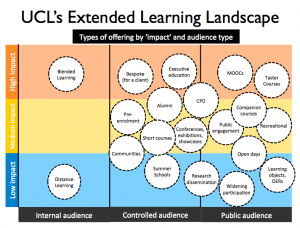
Extended Learning Landscape – UCL 2015
UCL is quite unique for some of these – we have multiple platforms which form a part of our Extended Learning Landscape. This maps out areas of activity such as CPD, short courses, Moocs, Public Engagement, Summer Schools (and many more) and tries to understand how we can utilise digital education / e-learning with these (and what happens when we do).
Justification for Moocs
We’ve not launched our first Mooc (apparently) but we also need to develop a mid term plan too – so we can do more. Can we justify the ones we’ve done so far? Well a strong evaluation will certainly help but we also need an answer to the most pertinent pending question:
How much did all this cost and was it worth it?
It’s a really good question, one we started asking a while ago, and still the answer feels no better than educated guesswork. Internally we’re working on merging a Costing and Pricing tool (not published, sorry) and the IoE / UCL Knowledge Lab Course Resource Appraisal Modeller (CRAM) tool. The goal is to have a tool which takes the design of a Mooc and outputs a realistic cost. It’s pretty close already – but we need to feed in some localisations from our internal Costing and Pricing tool such as Estates cost, staff wages, Full Economic Costings, digital infrastructure, support etc. The real cost of all this is important. But the value? Well…
Evaluation
We’ve had a lot of ideas and thoughts about evaluation; what is the value of running Moocs for the university? It feels right to mention public engagement, the spirit of giving back and developing really good resources that people can enjoy. There’s the golden carrot being dangled of student recruitment but I can’t see that balancing any Profit/Loss sheets. I do not think it’s about pedagogical innovation, let’s get real here: most Moocs are still a bulk of organised expert videos and text. I don’t think this does a disservice to our Moocs, or those of others, I’d wager that people really like organised expert videos and text (YouTube and Wikipedia being stable Top 10 Global Websites hints at this). But there are other reasons – building Moocs is an new way to engage a lot of people with your topic of interest. Dilution of the common corpus of subjects is a good thing; they are open to anyone who can access them. The next logical step is subjects of fascination, niche, specialist, bespoke – all apply to the future of Moocs.
For evaluation, some obvious things to measure are:
- Time from people spend on developing the Mooc – we’ve got a breakdown document which tries to list each part of making / running a Mooc so we can estimate time spent.
- Money spent on media production – this one tends to be easy
- Registration, survey, quiz, platform usage and associated learner data
- Feedback from course teams on their experience
- Outcomes from running a Mooc (book chapters, conference talks, awards won, research instigated)
- Teaching and learning augmentation (i.e. using the Mooc in a course/module/programme)
- Developing digital learning objects which can be shared / re-used
- Student recruitment from the Mooc
- Pathways to impact – for research-informed Moocs (and we’re working on refining what this means)
- How much we enjoyed the process – this does matter!
Developing a Mooc – lessons learned
Communication
Designing a course for FutureLearn involves a lot of communication; both internally and to external Partners, mostly our partner manager at FutureLearn but there are others too. This is mostly a serious number of emails – 1503 (so far) to be exact. How? If I knew I’d be rich or loaded with oodles of time. It’s another new years resolution: Stop: Think: Do you really need to send / read / keep that email? Likely not! I tried to get us on Trello early, as to avoid this but I didn’t do so well and as the number of people involved grew adding all these people to a humungous Trello board just seemed, well, unlikely. Email; I shall understand you one day, but for now, I surrender.
Making videos
From a bystander’s viewpoint I think the course teams all enjoyed making their videos (see final evaluation point). The Why We Post team had years to make their videos in-situ from their research across the world. This is a great opportunity to capture real people in the own context; I don’t think video gets much better than this. They had permission from the outset to use the video for educational purposes (good call) and wove them right into the fabric of the course – and you can tell. Making Babies in the 21st Century has captured some of the best minds in the field of reproduction; Dan Reisel (lead educator) knows the people he wants, he’s well connected and has captured and collated experts in the field – a unique and challenging achievement. Tim Shakespeare, The Many Faces of Dementia, was keener to capture three core groups for his course: people with Dementia, their carers / family and the experts who are working to improve the lives for people with Dementia. This triangle of people makes it a rounded experience for any learner, you’ll connect with at least one of these groups. Genius.
Also:
- Audio matters the most – bad audio = not watching
- Explain and show concepts – use the visual element of video to show what you mean, not a chin waggling around
- Keep it short – it’s not an attention span issue, it’s an ideal course structuring exercise.
- Show your face – people still want to see who’s talking at some point
- Do not record what can be read – it’s slower to listen than it is to read, if your video cam be replaced with an article, you may want to.
- Captions and transcripts are important – do as many as you can. Bonus: videos can then be translated.
Using third party works
Remains as tricky as it ever has been. Moocs are murky (commercial? educational? for-profit?) but you’ll need to ask permission for every single third-party piece of work you want to use. Best advice: try not to or be prepared to have no response! Images are the worst, it’s a challenge to find lots of great images that you’re allowed to use, and a course without images isn’t very visually compelling. Set aside some time for this.
Designing social courses that can also be skim-read
FutureLearn, in particular, is a socially-oriented learning platform – you’ll need to design a course around peer-to-peer discussion. Some is breaking thresholds – you’re trying to teach them something important, enabling rich discussion will help. You’re also trying to keep them engaged – so you can’t ask for a deep, thoughtful, intervention every 2 minutes. Find the balance between asking important questions – raising provocative points – and enjoying the fruits of the discussion with the reality of ‘respond if you want’ type discussion prompts.
Connect course teams together
While they might not hold one another’s hair when things get rough – the course teams will benefit from sharing their experiences with one another. We’ve held monthly meetings since the beginning, encouraging each team to attend and share their updates, challenges, show content, see examples from other courses and generally make it a more social experience. Some did share their dropboxes with one another – which I hadn’t expected but am enjoying the level of transparency. I am guilty of thinking at scale at the moment, so while I was guiding and pseudo ‘project-managing’ the courses, I was keen to promote independence and agency within the course teams. It’s their course, they’ll be the ones working into the night on it, I can’t have them relying on me and my dreaded inbox. The outcome is they build their own ideas and shape them in their own style; maybe we’re lucky but this is important. We do intervene at critical stages, recommending approaches and methods as appropriate.
Plan, design and then build
Few online learning environments make good drafting tools. We encouraged a three-stage development process:
- Proposals, expanded into Excel-based documents. Outlines each week, the headline for each step/component and critical elements like discussion starters.
- Design in documents – Word/Google Docs (whatever) – expand each week; what’s in each step. Great for editorial and refinement.
- Build in the platform.
The reason for this is the outlines are usually quick to fix when there’s a glaring structural omission or error. The document-based design then means content can be written, refined and steps planned out in a loose, familiar tool. Finally the platform needs to be played with, understood and then the documents translated into real courses. It’s not a solid process and some courses had an ABC (Arena Blended Connected) Curriculum Design stage, just to be sure a storyboard of the course made sense.
Overall
- It’s hard work – for the course teams – you can just see they’ll underestimate the amount of time needed.
- The value shows once you go live and people start registering, sharing early comments on the Week 0 discussion areas.
- These courses look good and work well as examples for others, Mooc or credit-bearing blended/online courses
- Courses don’t need to be big – 1/2 hours a week, 2-4 weeks is enough. I’d like to see more smaller Moocs
- Integrating your Moocs into taught programmes, modules, CPD courses makes a lot of sense
As a final observation before we go live with the first course: Why We Post: The Anthropology of Social Media, on Monday there was one thing that caught my eye early:
Every course team leader for our Moocs is primarily a researcher and their Moocs are produced, largely, from their research activity. UCL is research intensive, so this isn’t too crazy, but we’re also running an institutional initiative the Connected Curriculum which is designed to fully integrate research and teaching. The Digital Education team is keen to see how we build e-learning into research from the outset. This leads us to a new project in UCL entitled: Pathways to Impact: Research Outputs as Digital Education (ROADE) where we’re exploring research dissemination and e-learning objects and courses origins and value. More soon on that one – but our Mooc activity has really initiated this activity.
Coming soon – I hope – Reflections after UCL’s first Mooc 🙂
New UCL Open Education Special Interest Group
By Clive Young, on 26 February 2016

Inspired by the widespread interest in the UCL event Open Data as Open Educational Resources next Friday (places still available but filling fast), we are pleased to launch the the new UCL Open Education Special Interest Group (SIG) on Friday, 11 March staring at 2pm.
The topic of the session will review the past, present and future of Open Education at UCL in response to the aspiration in the draft UCL Education Strategy 2016-21
“We will have introduced an open education resources (OER) service to provide a showcase for UCL education and for student-generated content, and to bring together internal resources of common interest in support of the Connected Curriculum”.
The SIG and the event will be chaired by Simon Mahony (UCL Depratment of Information Studies) and coordinated by Javiera Atenas & Clive Young.
If you are interested in the increasingly important area of open education, and would like to register for the session, please sign up via Eventbrite.
Photo: elycefeliz on Flickr
IMPORTANT: No new Turnitin v1 assignment inboxes after the 22nd March 2016
By Domi C Sinclair, on 26 February 2016
Earlier this month it was announced that during the Moodle summer upgrade UCL will be moving to a single version of Turnitin, as Turnitin v1 assignments will no longer be supported by Moodle or Turnitin.
To help ease this transition we will be preventing the creation of new assignments using the Turnitin v1 activity on Tuesday 22nd March.
After this date, students will continue to be able to submit to existing Turnitin v1 assignments, but it will not be possible for Tutors and Course Administrators to create new Turnitin v1 assignments.
This decision has been taken to prevent anyone accidentally setting up an assignment with Turnitin v1 that will then not work after the 27th July 2016 (when we complete the Moodle upgrade).
If you need to set up a new Turnitin assignment after the 22nd March 2016, please use the Turnitin v2 activity.
Instructions on how to set up an assignment with Turnitin v2 can be found in the UCL Moodle Resource Centre wiki.
Turnitin Maintenance 5th March, 15:00 – 19:00 GMT
By Domi C Sinclair, on 22 February 2016
The Digital Education team have received the following notification from Turnitin that they will be carrying out maintenance on the 5th March between 15:00 – 19:00 GMT. This means the system will be unavailable during this time. All tutors and/or course administrators are advised to ensure they do not have submission deadlines during this time.
——-
From Turnitin:
Scheduled Maintenance on March 5th
Hello there,
Turnitin services may be intermittently unavailable during a scheduled maintenance period on Saturday, March 5, 2016 from 7 AM to 11 AM U.S. Pacific Time tinyurl.com/h5snhk7<http://go.turnitin.com/e/45292/h5snhk7/6jvb9s/522863099>.
An announcement will appear for users within Turnitin in advance of when the system will be unavailable for this scheduled maintenance. This maintenance will affect Turnitin and TurnitinUK users.
Instructors are encouraged to modify assignment due dates either before or at least several hours after the scheduled maintenance window.
Migration to Turnitin Single Version
By Domi C Sinclair, on 15 February 2016
As you may or may not know UCL is currently running two versions of the Turnitin plugin in Moodle. However when we do the summer upgrade of Moodle (22nd – 27 July) we will be removing one of these version of the plugin. During the upgrade process we will be removing Turnitin v1, meaning that after the upgrade is completed we will have only Turnitin v2 left on the Moodle system.
There are a few reasons why we are making this change, although the main reason is that Turnitin v1 is nearing the end of its life cycle. Turnitin are currently trying to phase out the plugin, and the version of Moodle we need to upgrade is not compatible with Turnitin v1. Therefore we will be transitioning to using only Turnitin v2. This single version will make it much easier for Digital Education to offer support with Turnitin issues, and it will also mean that support documentation is less confusing if you are unsure which version you are using.
Some of you may already be using Turnitin v2, if this is the case then you will simply to continue doing as you have been doing. If you are currently using Turnitin v1 then you may wish to look at our documentation for Turnitin v2. Hopefully you will see that the two versions work pretty much the same, although we think Turnitin v2 can be easier to use as it only has two screens to use – the submission inbox and the settings. (Please note: there are also ‘Turnitin Tutor’ and ‘Turnitin Student’ tabs but these are only for institutions that use both the Moodle plugin and access Turnitin directly through the web, which we do not do at UCL).
Some of the many other benefits of Turnitin v2 are as follows:
Easier to support – as mentioned before, if there is only 1 version to support we don;t need to spend time figuring our which version you are using. This also eliminates the risk of misunderstanding when communicating about errors that affect particular versions.
Easier to use (edit dates within settings) – All the settings for Turnitin v2 can be found in a single place, the settings page, this makes it much easier to use.
Submit any file type – It is possible to allow the submission on any file type in a Turnitin v2 assignment. However please note files that cannot be rendered in the document viewer will simply appear as a downloadable link, but you can still use many GradeMark features with them. For more information about file types that will render in the document viewer, please see our FAQ on compatible file types.
Single view submission inbox – This has also been mentioned else where but it is worth mentioning again. Unlike Turnitin v1, which has many different tabs to navigate between, Turnitin v2 as a single view submission inbox. (As previously stated please ignore the Turnitin Tutor and Turnitin Student tabs, these relate to direct web access which is unsupported at UCL).
Grade nothing – It is possible to grade offline work via Turnitin v2. Simply click on the grade (pencil) icon next to an empty submission to generate a ‘Grading Template’. This is presented in the document viewer as a plain sheet of paper with a Turnitin logo. You can then use all the normal GradeMark features including voice comments and rubrics.
Ability to email non-submitters – Turnitin v2 has a button in the submission inbox that allows you to email all students who have not yet submitted, even if anonymous marking is enabled. This will allow you to prompt those who still need to complete submission, without having to struggle around issues of anonymity.
Bulk download GradeMarked papers (after post-date) – Unlike Turnitin v1, with Turnitin v2 it is possible to bulk download GradeMarked papers after the post-date. This means all the grades, quick marks, comments and rubrics are included in the download. You can read more about how this works in our Turnitin FAQs.
If you would like to see a video demonstrating some of the above benefits then you can do so on our YouTube Channel.
Finally, you may be wondering about your existing Turnitin v1 assignments. These will all remain functional and accessible after the transition. All previous assignments will be available in the Moodle Snapshot. For any submission expected after the summer upgrade (22nd – 27th July 2016) we do ask that you set these up using Turnitin v2.
As the use of the two version is fairly similar there will be no official face-to-face training sessions run by Digital Education, but if you would like to see more about how to set up a Turnitin v2 assignment please see our videos on our YouTube channel.
If you would like to read more about the Moodle Summer Upgrade you can do so else where on our blog.
UCL Event: Open Data as Open Educational Resources
By Clive Young, on 12 February 2016

Open Data can be understood as “universally participatory data”, which is openly shared by government agencies, NGOs, academic institutions or international organisations.
Open Data is already being used in Higher Education using real life scenarios, bringing together students, academics and researchers working towards overcoming local and global real problems.
In this way students can develop transversal, research and citizenship skills, by working with the same raw materials researchers and policy makers use, contributing with the society in new and yet-unimagined ways.
There are clear links in this research-based educational approach to UCL’s Connected Curriculum.
In many disciplines, anecdotal evidence from teachers shows that students don’t often see research datasets or the research/lab logs, but these are fundamental tools to comprehend research work, workflow and processes, however, we believe students should be given the opportunity to work analysing datasets to conduct discoveries of their own and/or to attempt the replication of research findings, enabling students to understand good practices in data management and data analysis skills.
UCL is proud to host this event on Friday, 4 March 2016 from 14:00 to 17:00.
Speakers include
- Santiago Martín: University College London
- Mor Rubistein: Open Knowledge Fundation
- Leo Havemann: Birkbeck, University of London
- Dr Carla Bonina: University of Surrey
- William Hammonds: Universites UK
- Dr Fabrizio Scrollini: Latin American Open Data Initiative
- Dr Tim Coughlan: Open University
Please book your place at